

All of you would have heard about Jev. People are talking about it on LinkedIn and X. Initially, I thought it was another AI model. But then I read their docs and understood that it was different from other AI models.
Jev is not for generating long texts or writing code. It is actually built for different type of work. It is for making small decisions in a workflow.
I can explain clearly in this blog. This blog covers,
What is Jev
What is System One Model
How Jev works
How is Jev different from an LLM
Set up Jev and try a simple example
Jev inside Agentic Workflow
Jev vs OpenAI Decisions API
Limitations of Jev
1. What is Jev?
Jev is an AI model developed by a company called TypeSafe AI. They launched Jev in September 2026.
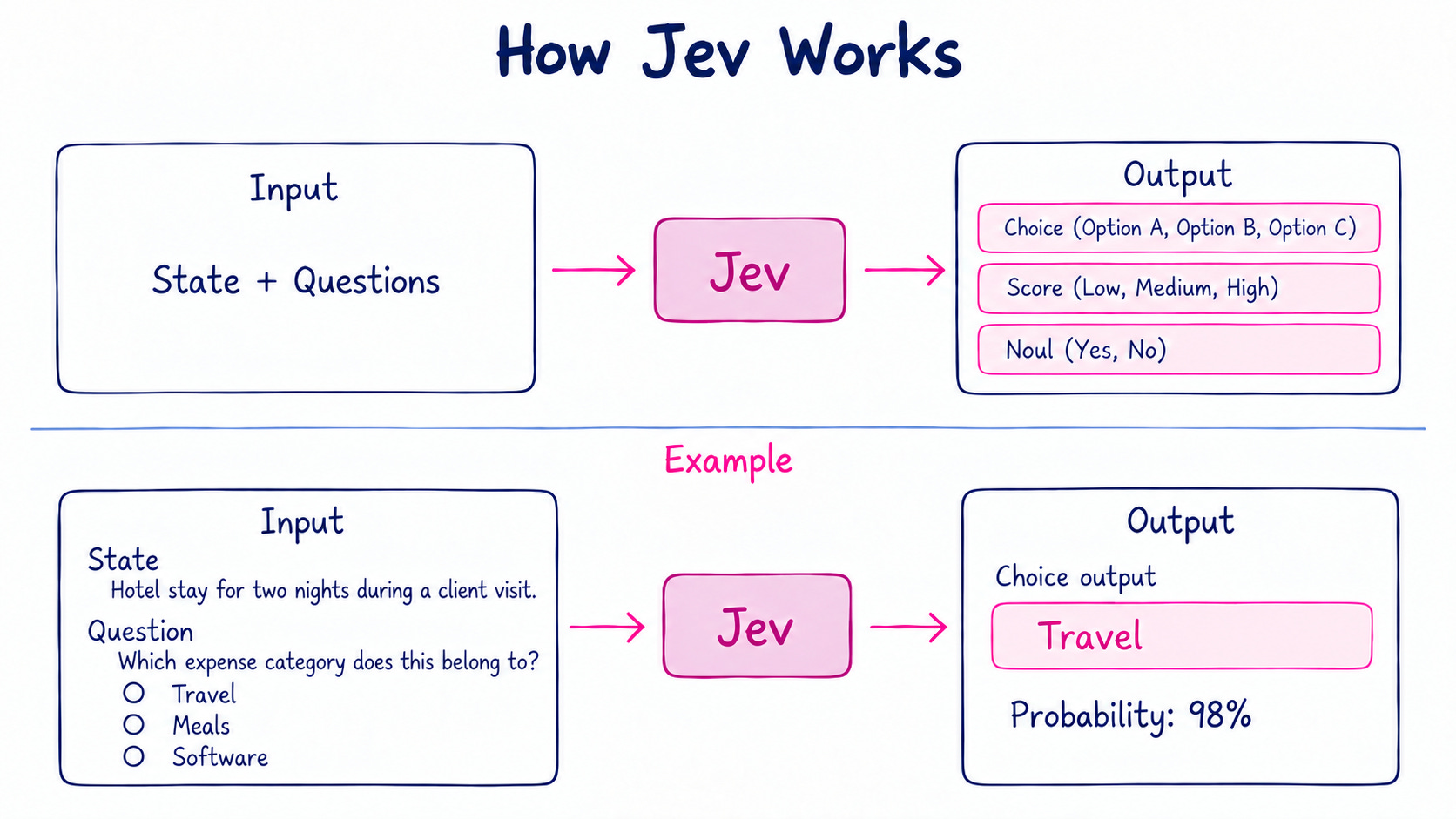
Jev will not generate long text like other AI models. To use Jev, we need to send the input, question and possible answers. Jev checks them and selects one answer. It also gives the probability for that answer.
For example, we can give some expense details and ask which category it belongs to. We can give Travel, Meals and Software as options. Jev will select one from these options.
The below picture explains it better.
TypeSafe AI - calls Jev as its first System One Model. Let us see what is a System One Model.
2. What is a System One Model?
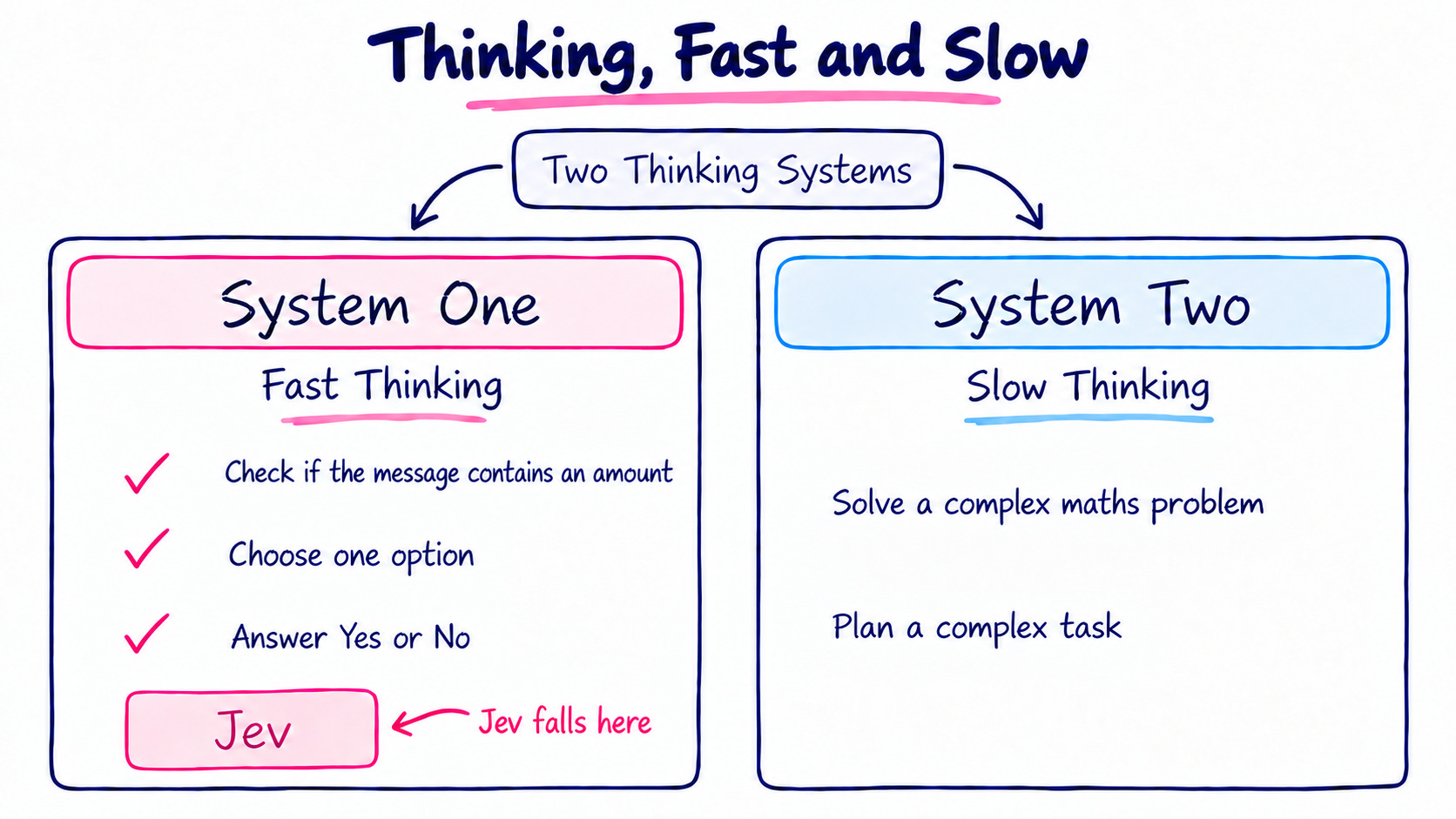
The System One name came from a famous book. Its called "Thinking, Fast and Slow” which was written by Daniel Kahneman. The book speaks about two types of thinking. One is System One and another one is System Two.
System One thinking happens quickly. For example, when we read an angry message, we immediately understand that the person is angry. We dont need to check every word and think about it separately. Our mind understands it quickly.
System Two is slower. It is used when something needs more attention and thinking. For example, solving a complex math problem. We need to understand the problem, calculate it step by step and then find the answer. So it takes more time.
Jev falls under System One. It makes quick decisions. Jev is used to select one option from the list, or answering yes or no.
3. How Jev Works?
Jev can be used when our software needs to make a small decision. For example, checking whether something is true, selecting one option from a list, or giving a score.
To get a decision from Jev, we need to send two things. State and question.
State - It is an information Jev needs to check. It can be a customer message, expense details, an email, or any other text.
Question - It tells Jev what it needs to find from the state.
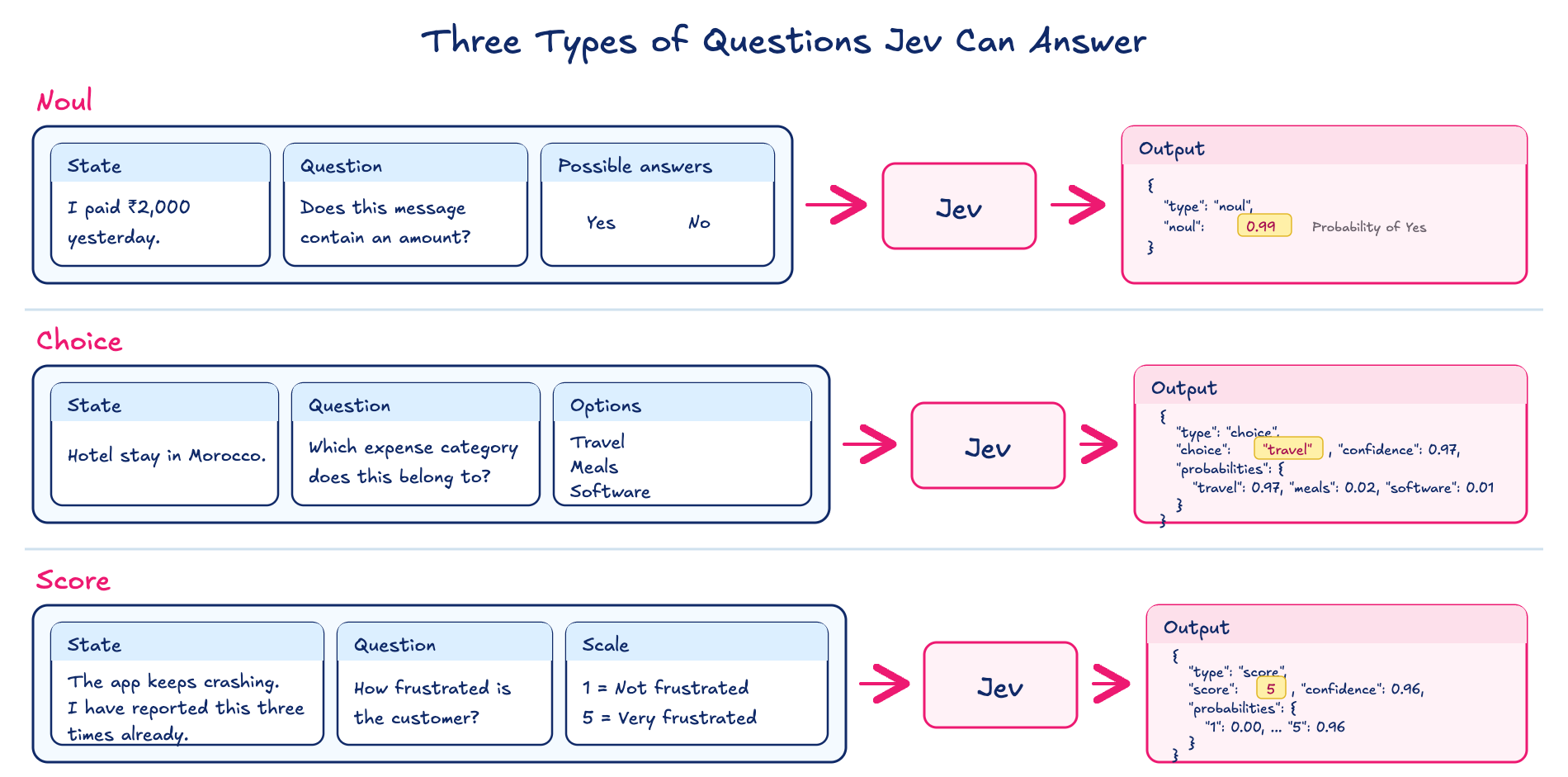
Jev supports three types of questions. Noul, Choice and Score.
Noul - Yes or No questions. Jev gives the probability of the answer being Yes.
Choice - for selecting one option from a given list. Jev returns the selected option along with its probability and confidence.
Score - for rating something based on a scale we define. Jev returns the score and its confidence.
The below picture explains all three question types with separate examples.
4. How is Jev Different From an LLM?
GPT and Claude can also make these small decisions. But these models are built for many other works like writing, coding, reasoning and conversations. They generate the answer token by token.
Jev works differently. It is mainly built for making decisions. TypeSafe AI calls its training method Reinforcement Learning for Calibrated Decisions (RLCD). Jev gives the decision and its probability as Json output. This probability tells how sure Jev is about the decision. It does not generate the output, token by token like an LLM.
The below video explains this with a simple example.
5. Set up Jev and Try a Simple Example
Now, let us try Jev with a simple example. For this, I am using BeatAPI. It provides access to Jev through an API and also has a free model named jev-1.13-free.
First, create an account in BeatAPI and get an API Key. Save the key in a .env file like this.
BEATAPI_API_KEY=your_api_keyNow, create a JavaScript file and add the below code.
const response = await fetch("https://api.beatapi.io/v1/systemone", {
  method: "POST",
  headers: {
    Authorization: `Bearer ${process.env.BEATAPI_API_KEY}`,
    "Content-Type": "application/json",
  },
  body: JSON.stringify({
    model: "jev-1.13-free",

    state: "The app closes every time I upload a file.",

    questions: {
      team: {
        type: "choice",
        instructions: "Which team should handle this customer message?",

        criteria: {
          technicalSupport: "Problems with the app or its features",
          sales: "Questions about buying or upgrading",
          accounts: "Questions about account access or settings",
        },
      },
    },
  }),
});

const result = await response.json();
console.log(result);
Here, the customer message is the state. We are asking Jev which team should handle that message. We have also given three possible choices: Technical Support, Sales, and Accounts.
When I ran this, Jev selected technicalSupport. It returned a confidence of 1, along with the probability for each option.
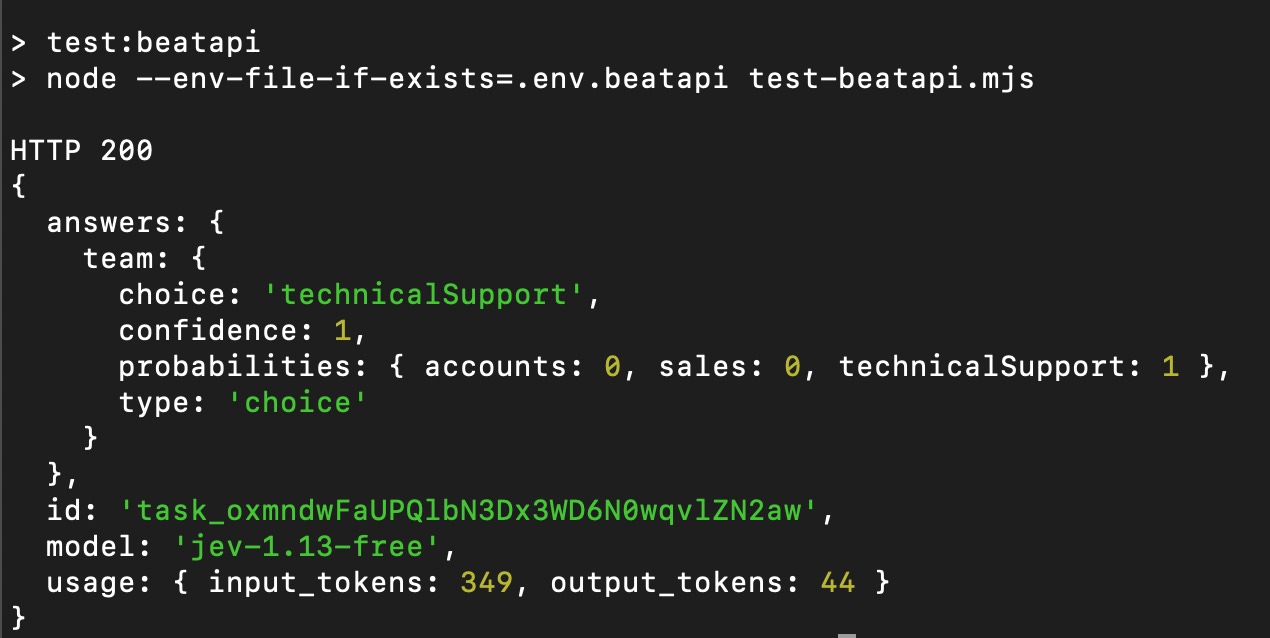
Jev does not generate the output as a natural language sentence. It returns the output in JSON format with the selected choice and probabilities. Our code has to read this JSON and decide what to do next.
Time and Cost Comparison between Jev and GPT-6.1 Sol
I tested the decision task against Jev and OpenAI GPT Sol.
I wanted to check the time and cost difference between Jev and GPT Sol. So I sent the same customer message to Jev and GPT-6.1 Sol. In GPT-6.1 Sol, I used medium reasoning. Both models selected “Technical Support” as an answer. And it is right too.
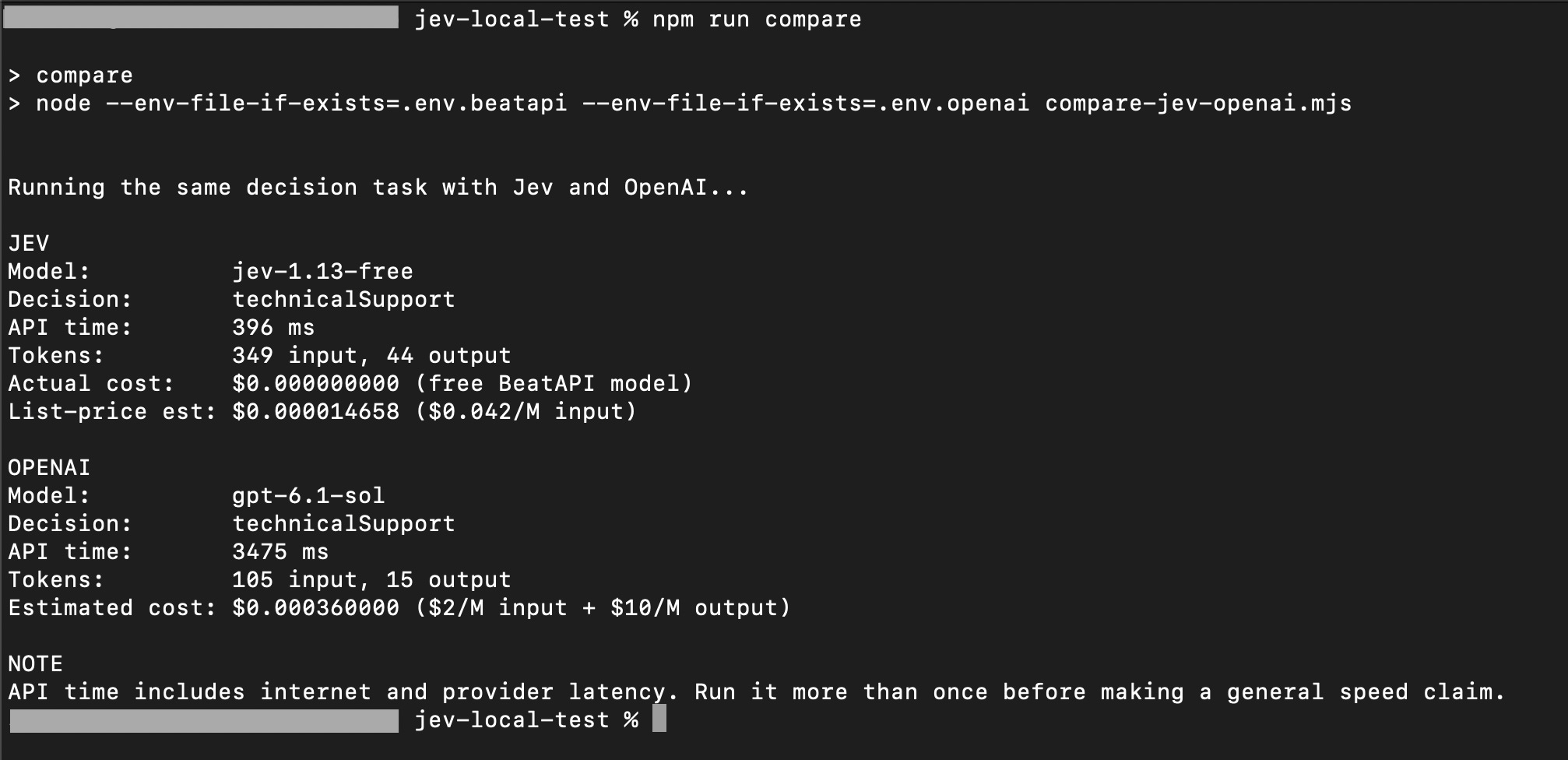
But see the difference here.
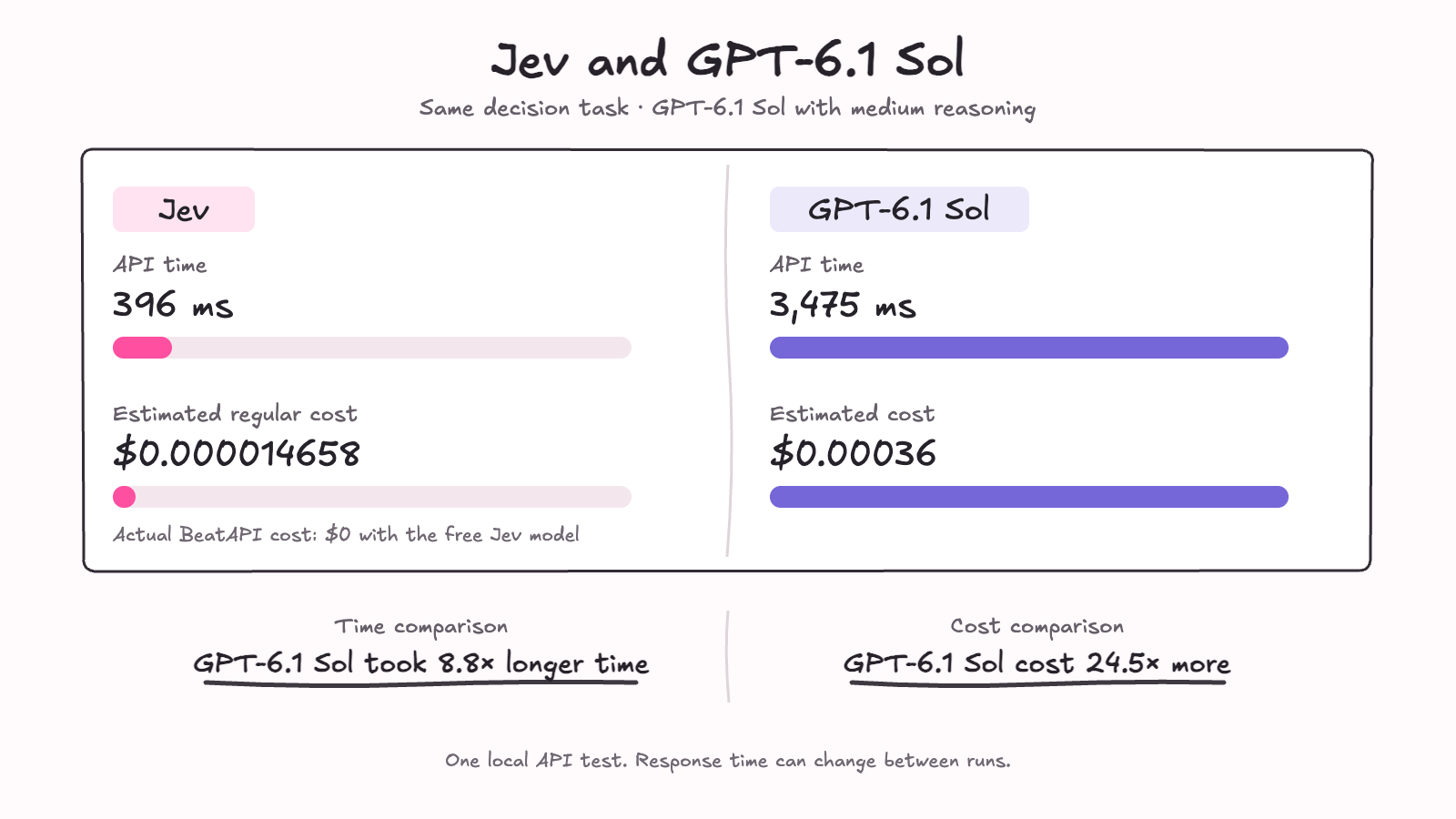
6. Jev Inside an Agentic Workflow
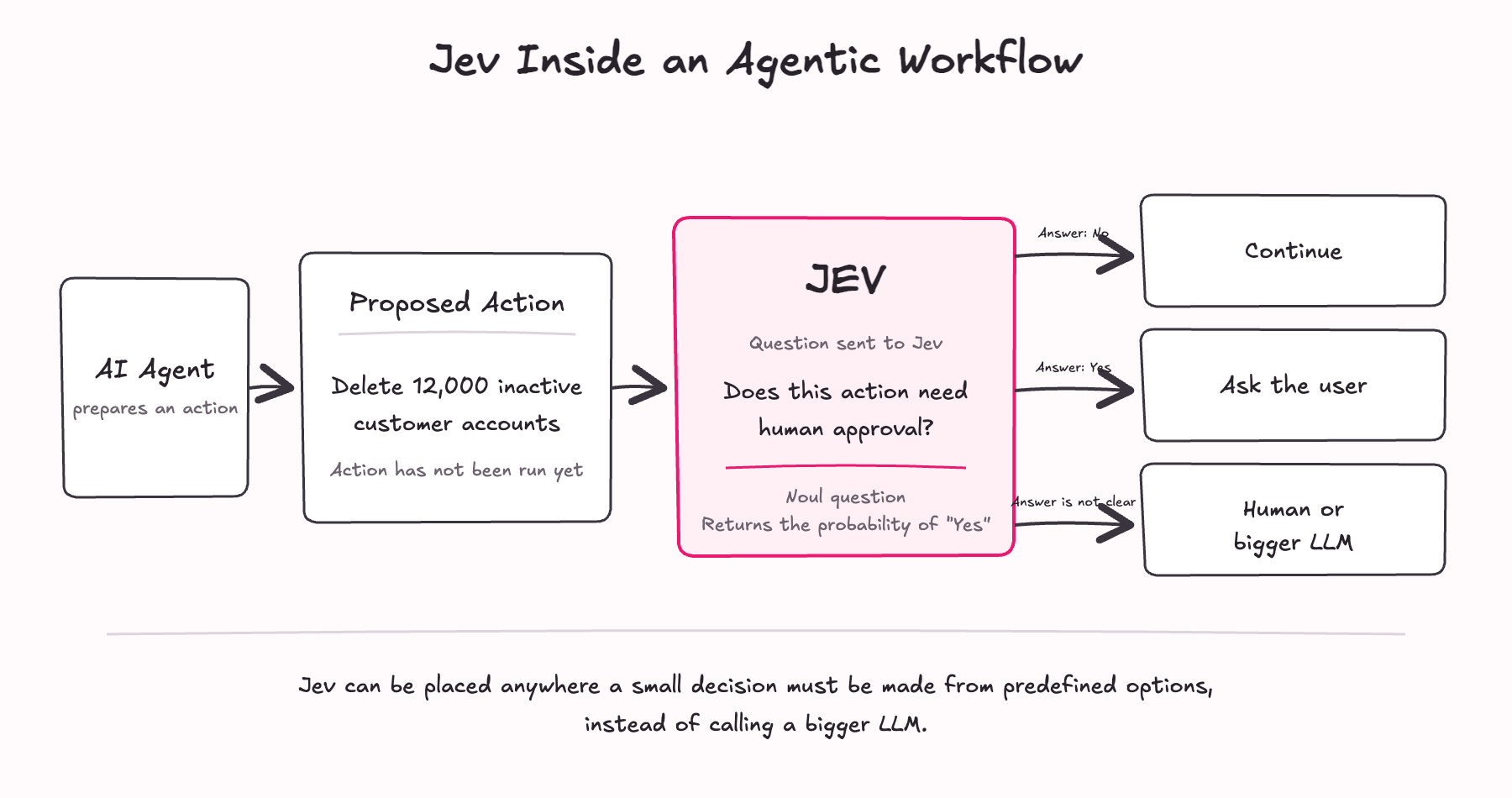
Till now, we tried Jev as a separate flow. But Jev can also be used inside an agentic workflow.
Agentic workflow will have many steps. It can have orchestrator, agents, tools etc. In this workflow, if there is a need to take a small predefined decision, then we can plug Jev there.
Main agent will continue doing the work. Jev will take care of the small decisions for less cost and time. So we dont need to call a bigger model every time.
So Jev will replace the bigger LLM API calls, for smaller decision tasks.
7. Jev vs OpenAI Decisions API
When I started writing this blog, OpenAI also released its Decisions API on October 6, 2026. When I checked it, it looked very similar to Jev.
They both can be used for small decision tasks. We send the input, questions and choices. They give answers with probability.
OpenAI says its Decisions API is 10 times faster than normal Responses API.
Important point is, OpenAI’s Decision API supports images. But Jev does not support images.
I tried both Jev and OpenAI Decisions API with the same input. I wanted to see the time and cost by myself. See the result below.
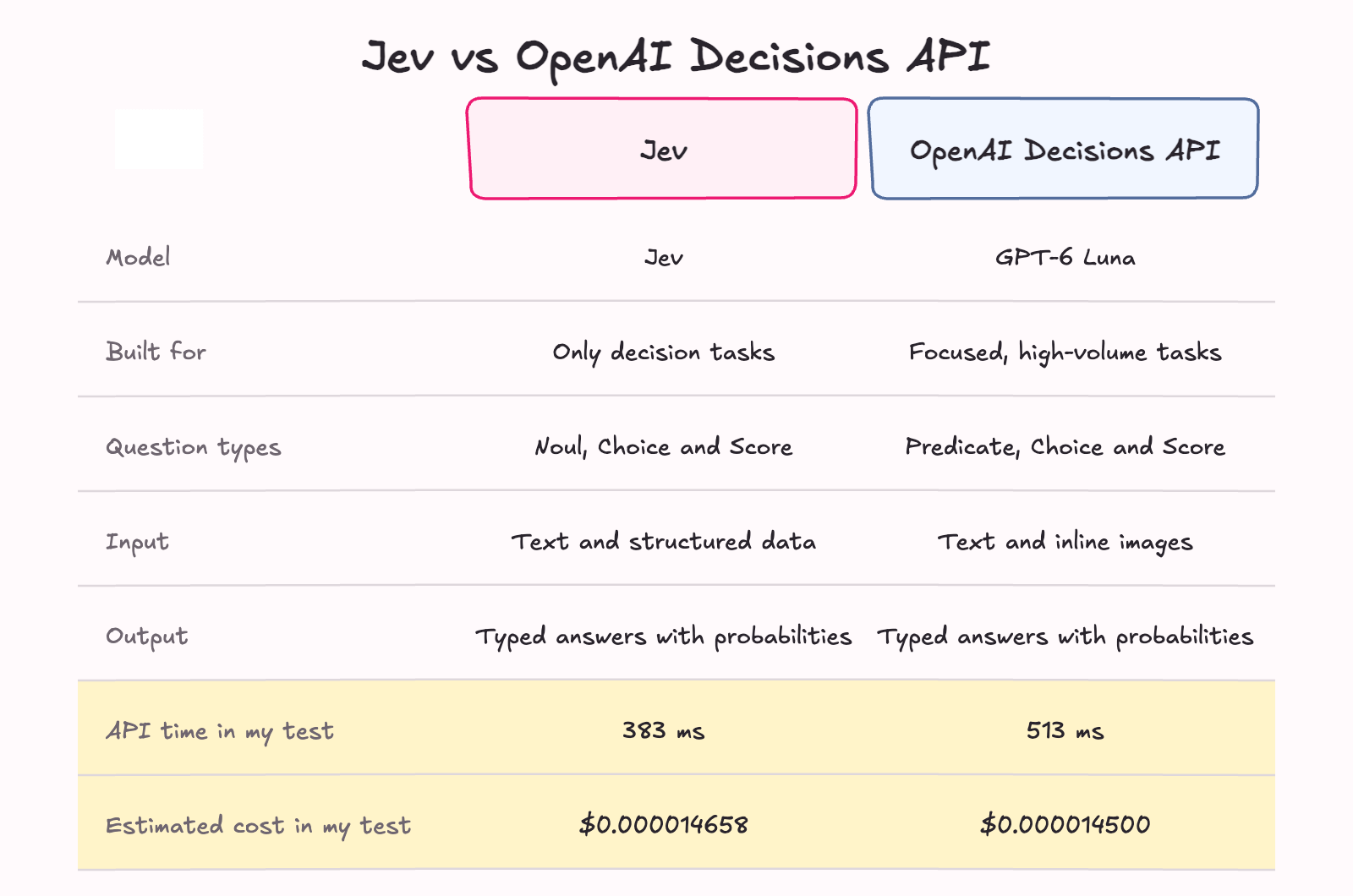
In my test, the estimated cost was almost same for both. OpenAI Decisions API cost was slightly lower, while Jev was slightly faster.
8. Limitations of Jev
Jev does not support images.
Jev cannot generate text, code.
The questions and possible answers should be defined before sending the request.
It can also make a wrong decision.
Jev only returns the decision and probabilities in JSON format. We need to write the code to process this output and decide what should happen next.
Jev is still new. So we need to test it properly before using it for important decisions.
Conclusion
Jev is built for making small decisions. It cannot replace GPT or Claude. But it can replace some of the bigger model calls where we only need a Yes or No. Or where we only need one option among others.
Now OpenAI has also released a Decisions API for similar use cases. So it looks like decision models may become a separate part of AI workflows.
Both Jev and OpenAI Decisions API are still new. We need to try them with real workflows and see where they work well.
Try them in your workflows today!
Happy Building!