

DeepSeek’s arrival in January 2025 created a wave across the AI industry. It’s not just because DeepSeek performed equally to OpenAI and Anthropic models. It was because of the lower training and inference costs.
Now, Kimi K3 is getting similar attention.
The model is competing with some of the best models from OpenAI and Anthropic, especially in coding and long-running agentic tasks.
One reason could be its size. Kimi K3 has 2.8T params, so it has a lot of capacity. But the main thing is that it is an MoE model. It doesn’t activate all its parameters for every token. During inference, it uses only a small part of the model.
This is what makes Kimi K3 interesting. It is a bigger model, but it uses sparse activation. It also comes with a 1M token context window.
In this blog, let us see how Kimi K3 is built, how it is different from other MoE models, and how it performs compared to other frontier models.
Kimi K3 - Technical Details
Kimi K3 - A Large Model with a Small Expert Selection
The Three Main Components Behind Kimi K3
What the Kimi K3 Benchmarks Show
How to Use Kimi K3 in Claude Code and Codex
Kimi K3 vs Opus 5 and GPT-5.6: Quality, Speed, and Cost
1. Kimi K3 - Technical Details
Before we get into the architecture, let us first compare Kimi K2 and Kimi K3.
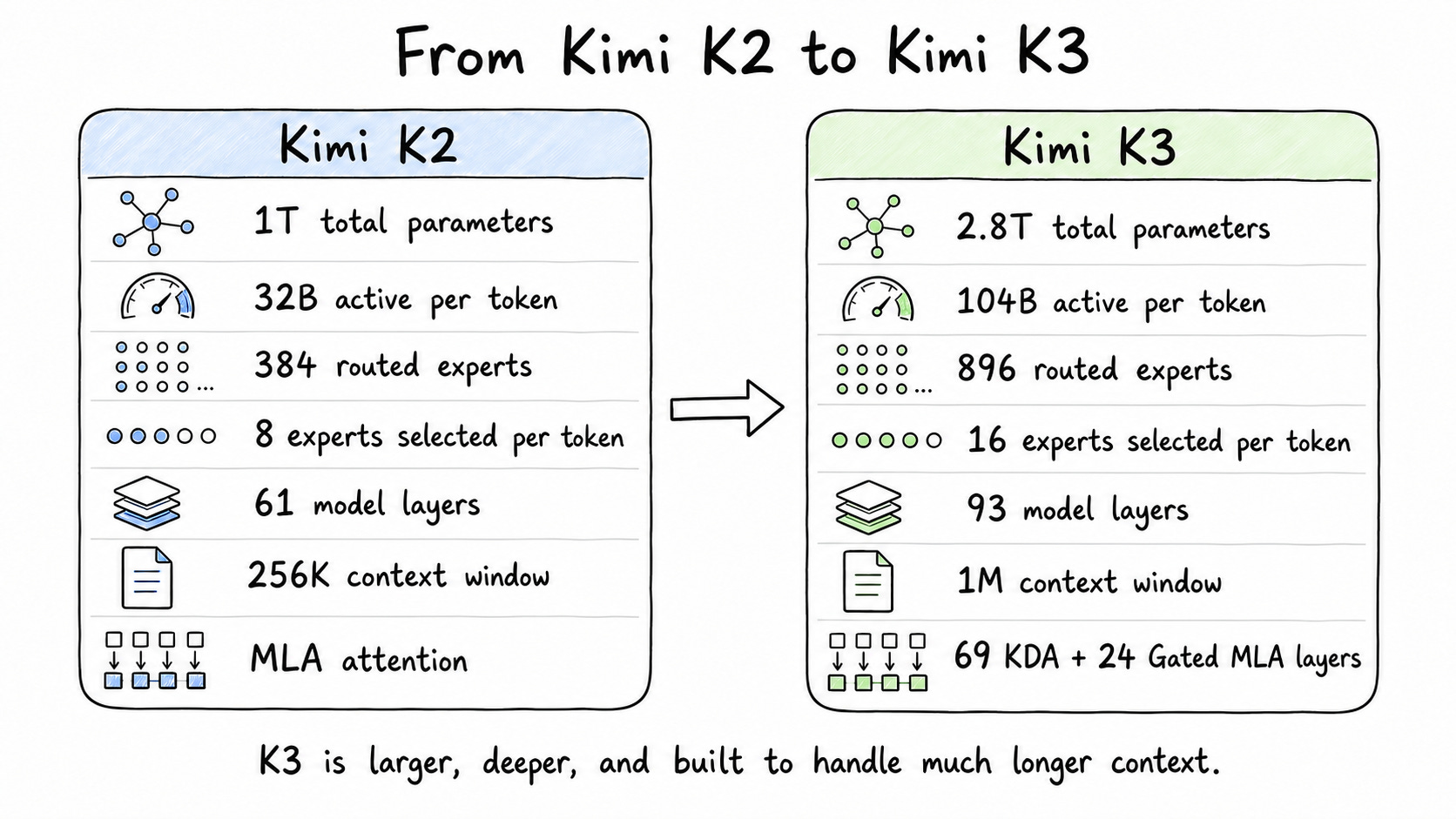
As you can see, Kimi K2 has 1T params, while Kimi K3 has 2.8T params. Moonshot also increased the number of experts and layers. It changed the attention system and extended the context window.
Here is a quick technical overview of Kimi K3.
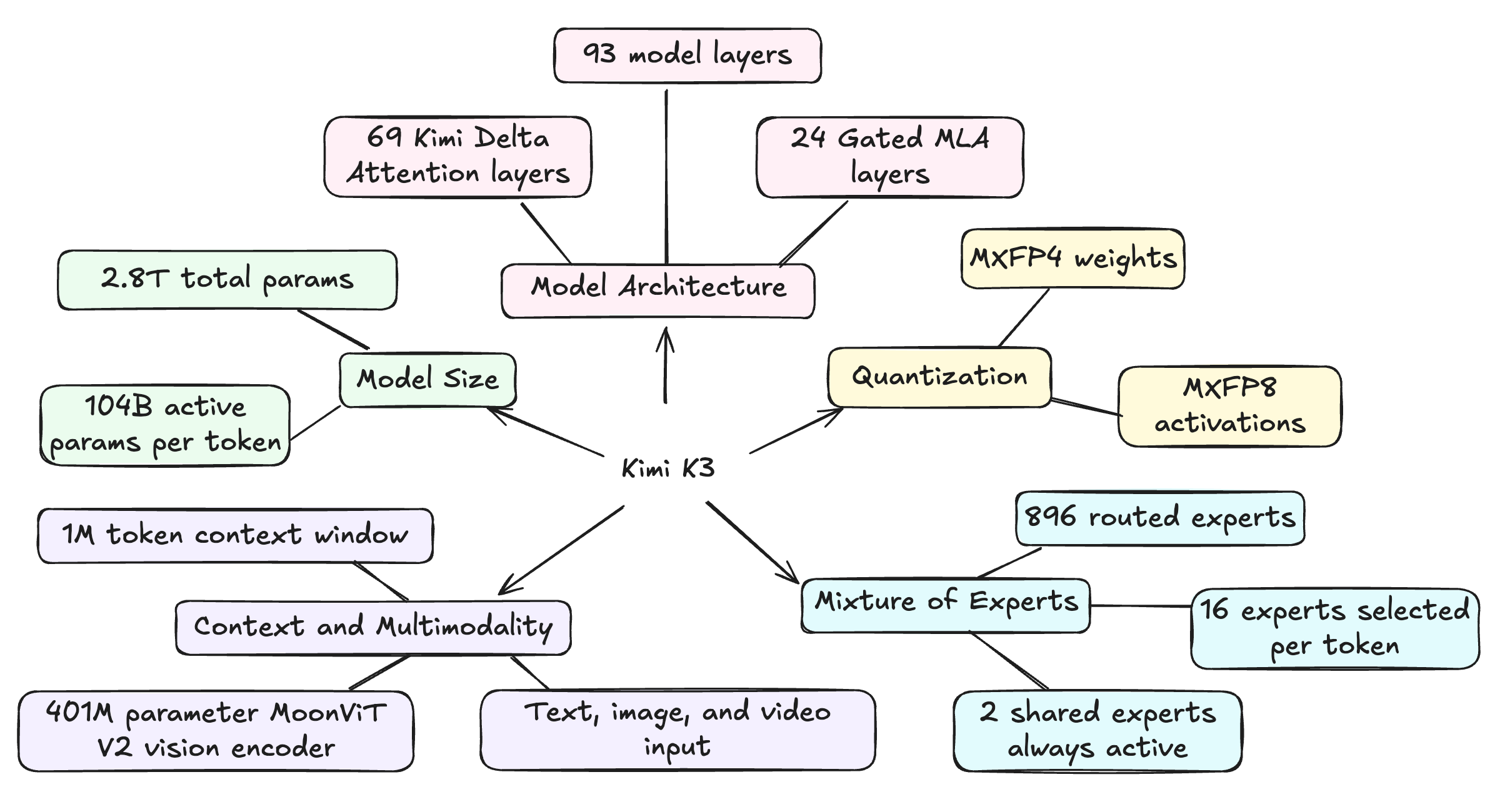
Kimi K3 supports a 1M token context window. It uses Kimi Delta Attention and Gated MLA layers to handle such a long context. Let us see how these attention layers work in the next section.
Kimi K3 is also a native multimodal model. It can take text, images, and video as input. For visual inputs, it uses MoonViT V2, a vision encoder with 401M params. This encoder converts the visual content into a format that the main model can understand.
Kimi K3 uses MXFP4 for its weights and MXFP8 for its activations. Both are lower-precision formats. So, they help reduce the memory and compute needed during training and inference.
Moonshot started quantization-aware training from the supervised fine-tuning stage itself. So, the model was trained to work with these lower-precision formats.
2. Kimi K3 - A Large Model with a Small Expert Selection
Kimi K3 is an MoE model. So, it doesn’t use all its 2.8T params for every token. It has a large pool of experts, and a router decides which experts need to handle the token.
Kimi K3 has 896 routed experts. The router selects 16 of them for each token. Apart from this, two shared experts are always active.
So, Kimi K3 selects only around 1.8% of its routed expert pool for every token.
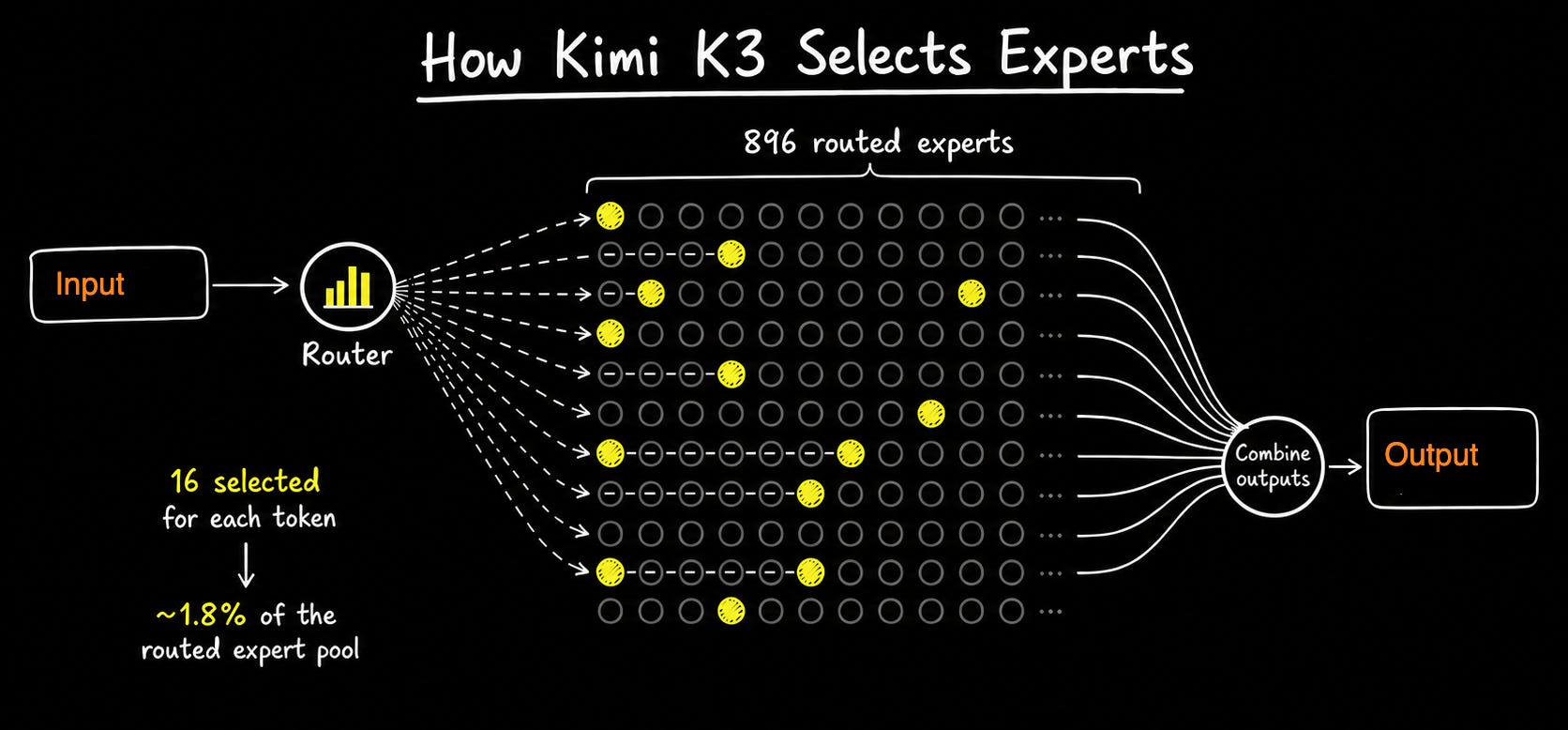
Here, the 1.8% can be a little confusing. It is the percentage of routed experts selected. It doesn’t mean that only 1.8% of the model’s total params are active.
In terms of parameters, Kimi K3 activates around 104B out of its total 2.8T params for every token.
The comparison below will make this easier to understand.
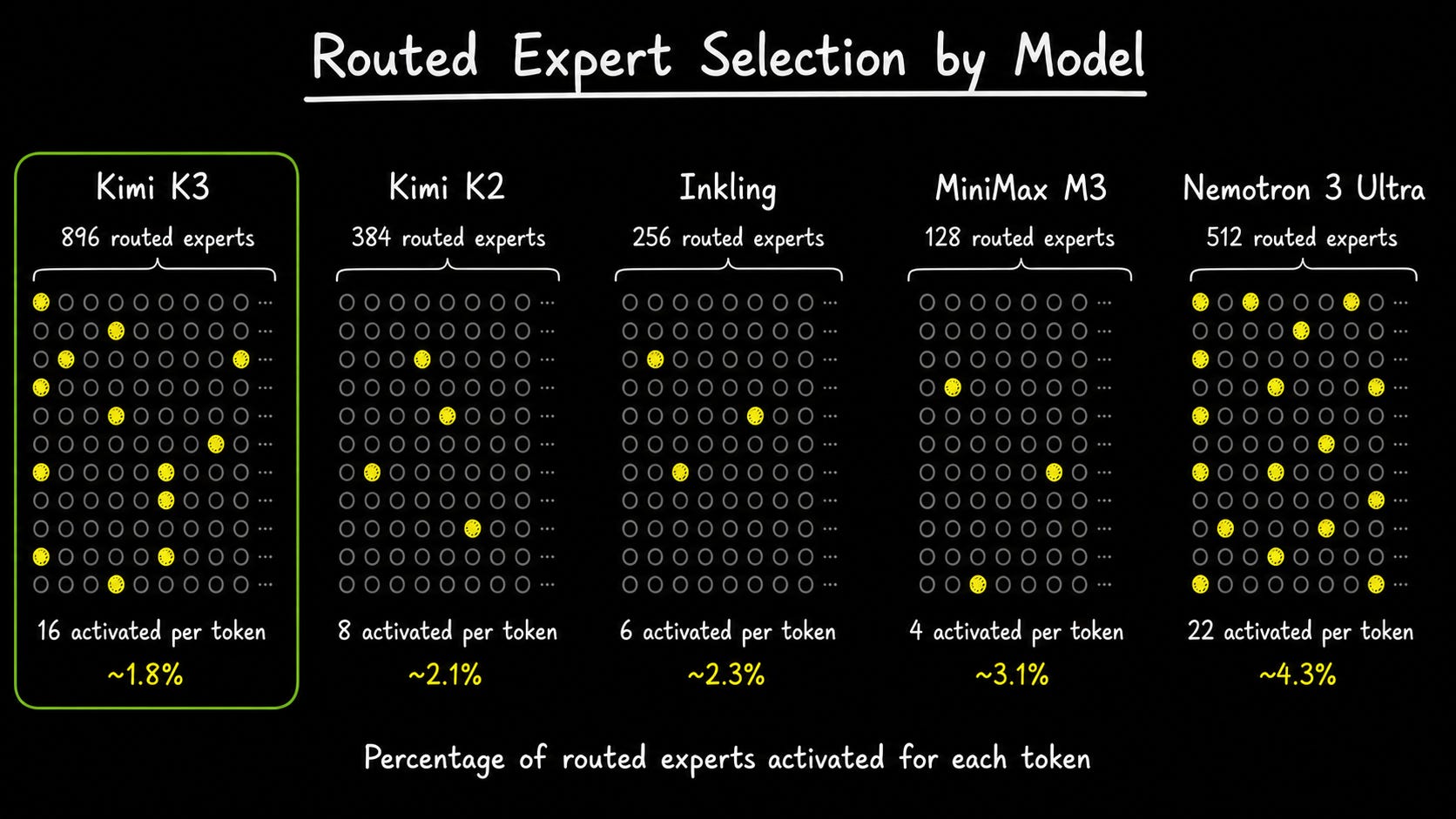
Kimi K2 selected 8 out of 384 routed experts, which is around 2.1%. Kimi K3 selects 16 experts from a much bigger pool of 896. So, even though K3 selects more experts, the percentage is lower at around 1.8%.
Since these experts are spread across many GPUs, there are two problems to handle. First, the data needs to move between the GPUs. Second, some experts may get more work than others. Moonshot uses Stable LatentMoE and Quantile Balancing to handle these problems. Let us see how they work in the next section.
3. The Three Main Components Behind Kimi K3
Kimi K3’s architecture has three main components. Let us start with Stable LatentMoE.
1. Stable LatentMoE
As we saw earlier, Kimi K3’s experts are spread across many GPUs. Whenever a token is sent to an expert, the data also needs to move between the GPUs. This adds extra communication cost.
Stable LatentMoE helps to reduce this data movement. It compresses the token data into a smaller size before sending it to the selected experts. After the experts process the data, the result is expanded back to the model’s original size.
There is also one more thing to handle. Some experts may get selected too often, while others may get less work. Kimi K3 uses Quantile Balancing to spread the tokens across its expert pool.
2. Kimi Delta Attention
The second component is Kimi Delta Attention. Kimi K3 supports a 1M token context window. If it used full attention in every layer, it would need a lot of memory and compute.
KDA avoids this by keeping earlier information in a fixed-size memory. When a new token comes in, it updates the memory. The Model decides what to keep and what to forget.
Kimi K3 doesn’t use KDA in every layer. It has 69 KDA layers and 24 Gated MLA layers. KDA handles most of the long context, while the Gated MLA layers use full attention at regular intervals. This allows the model to look across the complete context when needed.
3. Attention Residuals
Kimi Delta Attention handles the context length. Attention Residuals works on a different problem. It handles the model’s depth.
Kimi K3 has 93 layers. Usually, each layer gets the output from the layer before it. When information moves through many layers, some details from the earlier layers may become weak.
Attention Residuals allows each layer to look back at the earlier layer outputs and pick the information it needs. So, it doesn’t depend only on the information passed from one layer to the next.
The diagram below shows how these three components fit into the input-output flow.
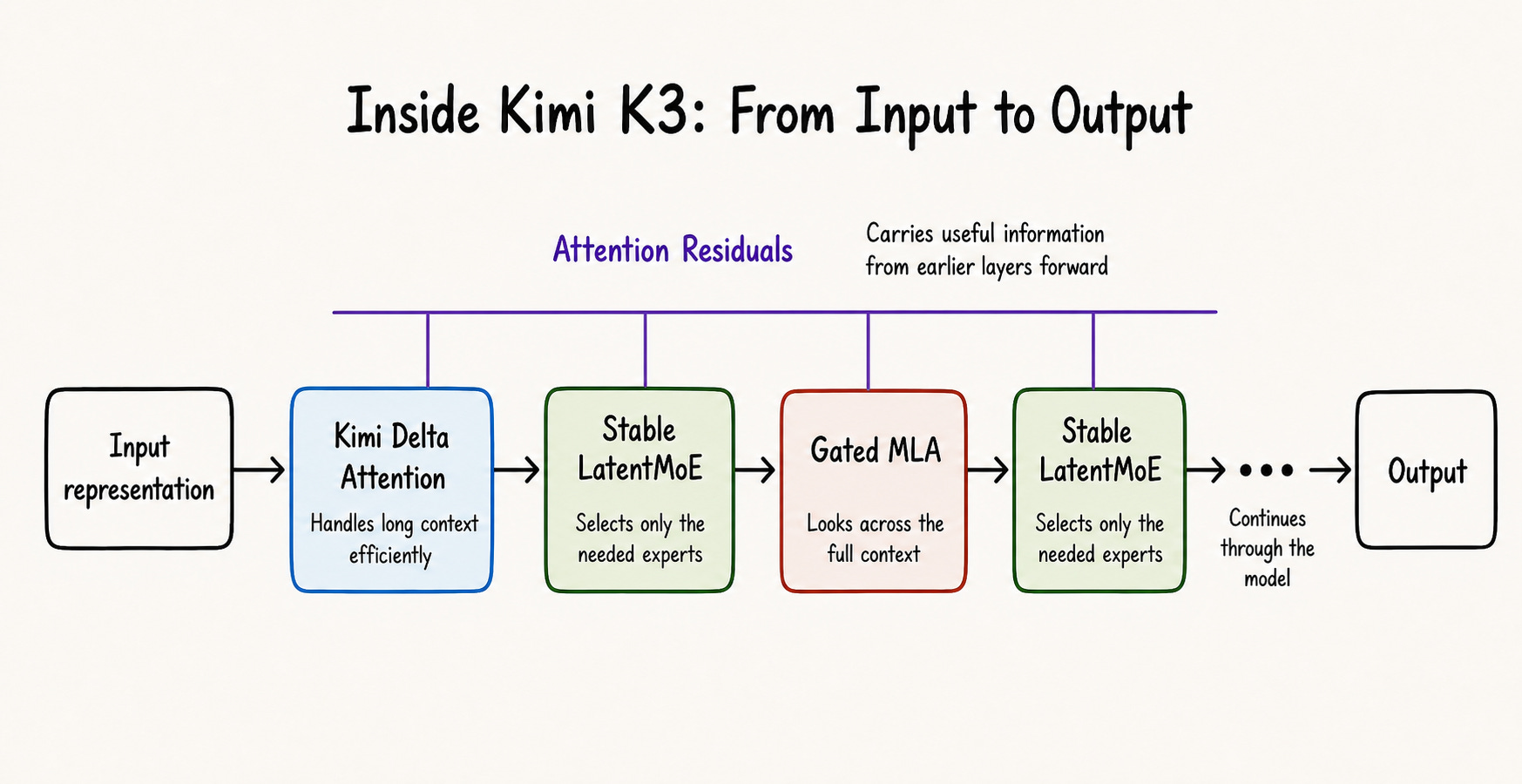
In simple terms, Stable LatentMoE reduces the amount of data moved between GPUs. Kimi Delta Attention handles the long context. Attention Residuals helps each layer retrieve useful information from earlier layers.
Moonshot says these changes made Kimi K3 - 2.5 times more efficient at scaling than Kimi K2. This refers to the overall improvement across the architecture and training.
4. What the Kimi K3 Benchmarks Show
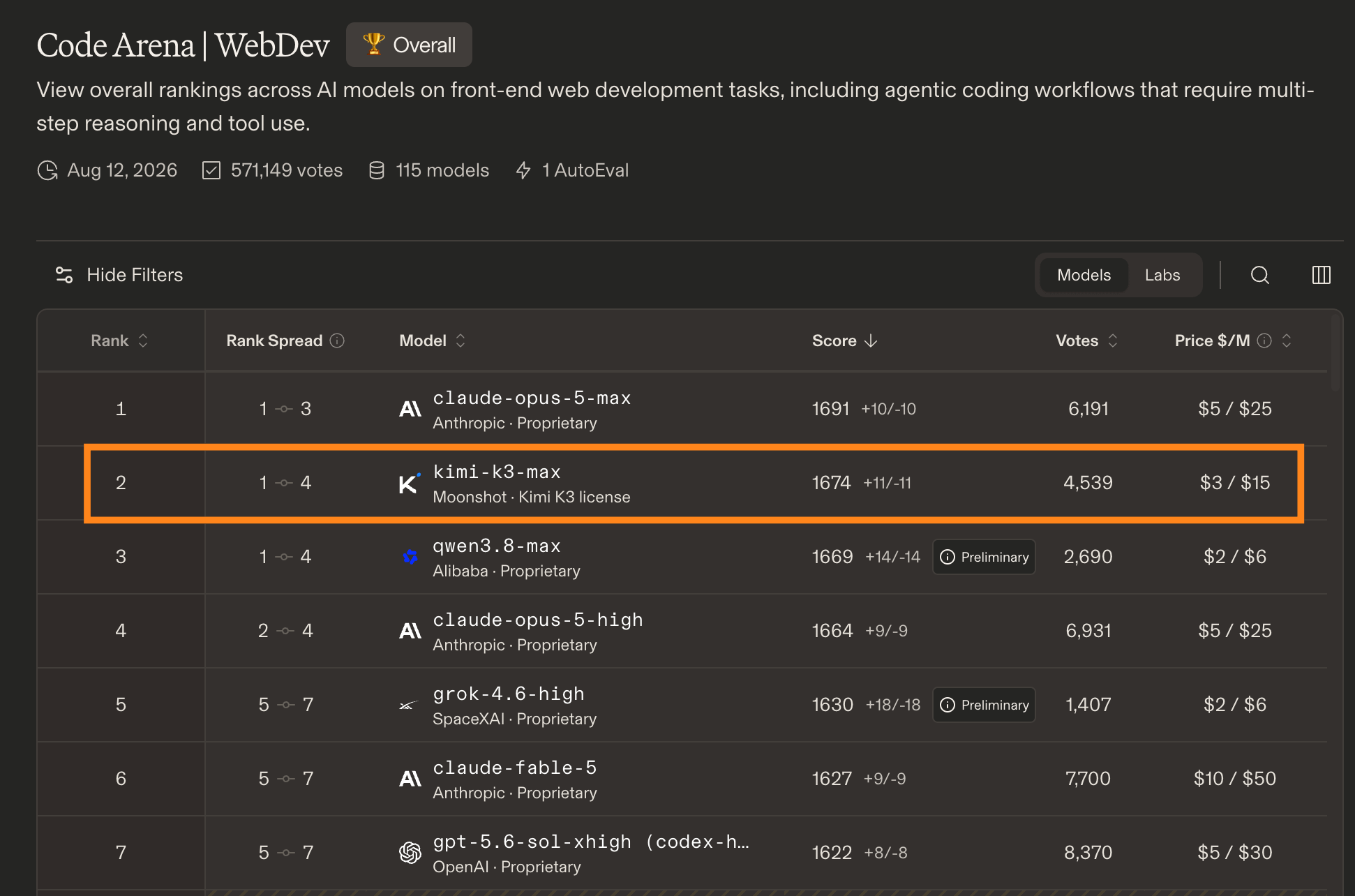
When I checked the Arena rankings, Kimi K3 Max was among the top models.
In the WebDev leaderboard, it ranked second. It was just behind Claude Opus 5 Max and ahead of several models from OpenAI, Anthropic, and Alibaba.
In Agent Arena, Kimi K3 Max ranked fifth. This leaderboard looks at how well models complete real-world agentic tasks.
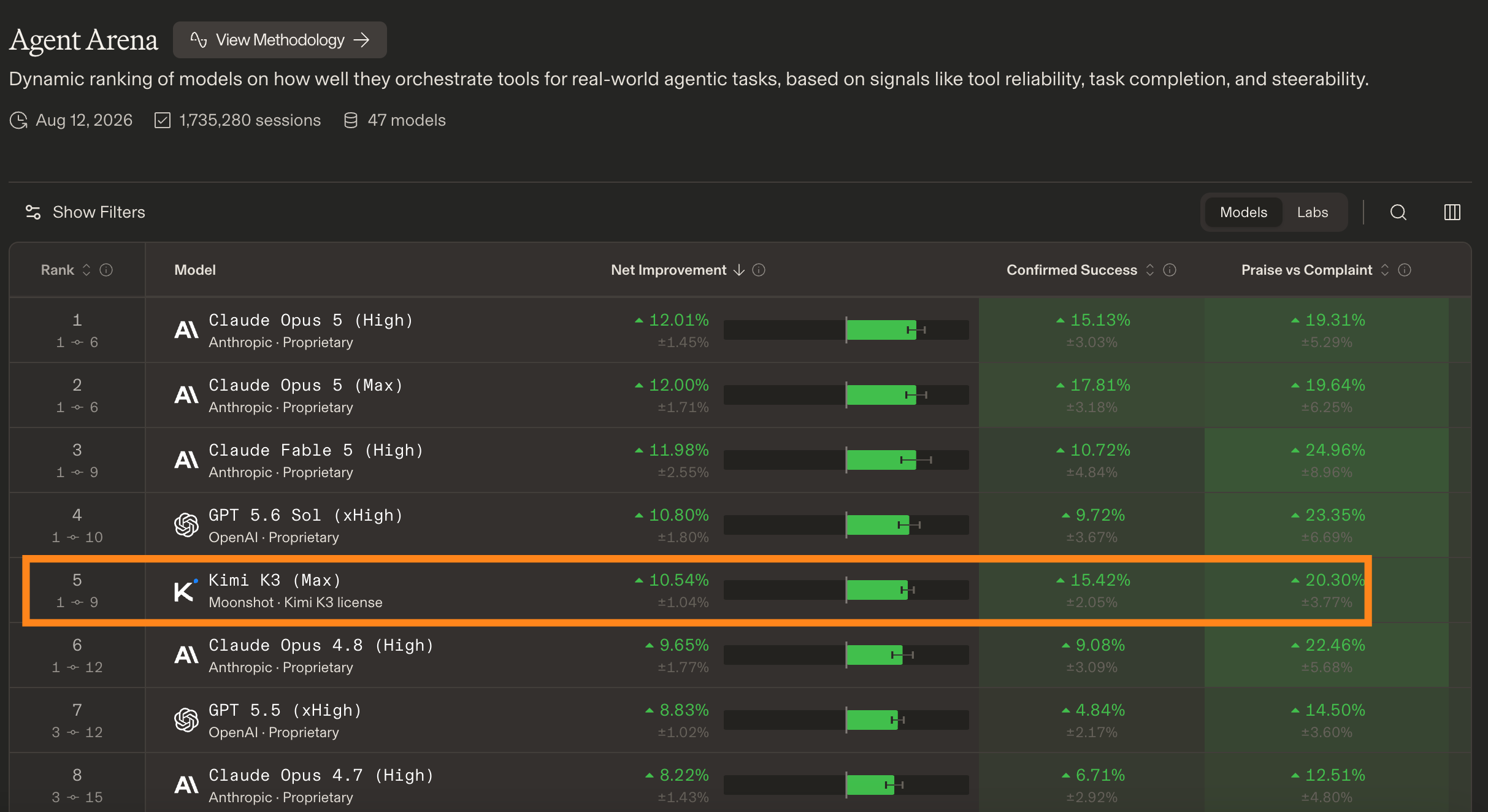
These rankings may change when more models and results are added. But at the time I checked, Kimi K3 was near the top in both web development and agentic tasks.
5. How to Use Kimi K3 in Claude Code and Codex
I am using Kimi K3 through Fireworks. I used Fireconnect to connect it with Claude Code and Codex.
First, we need to install Fireconnect and login.
curl -fsSL https://raw.githubusercontent.com/fw-ai/fireconnect/main/install.sh | bash

fireconnect login
If you want to check all the available models in Fireworks then run,
fireconnect model listUse Kimi K3 in Claude Code
You can run this command to connect Kimi K3 from fireworks to Claude Code.
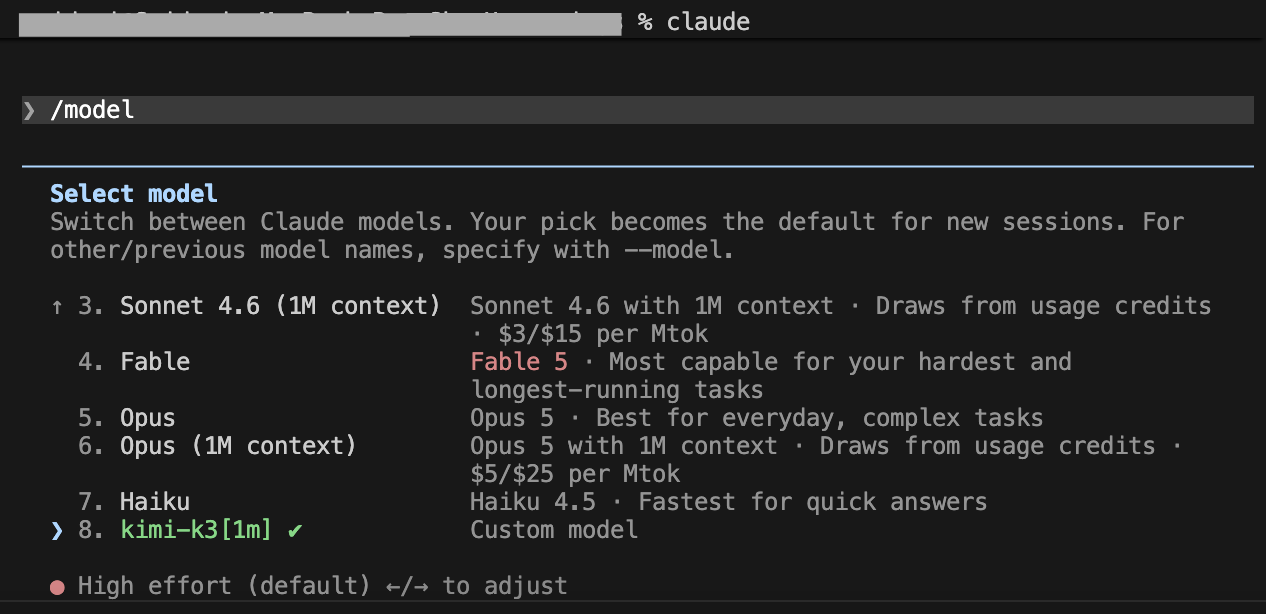
fireconnect claude on --model kimi-k3Now open Claude Code and use /model and check whether Kimi K3 is selected.
Use Kimi K3 in Codex
For Codex, run:
fireconnect codex on --model kimi-k3Open Codex and check the model selection. You should see Kimi K3 as the active model.
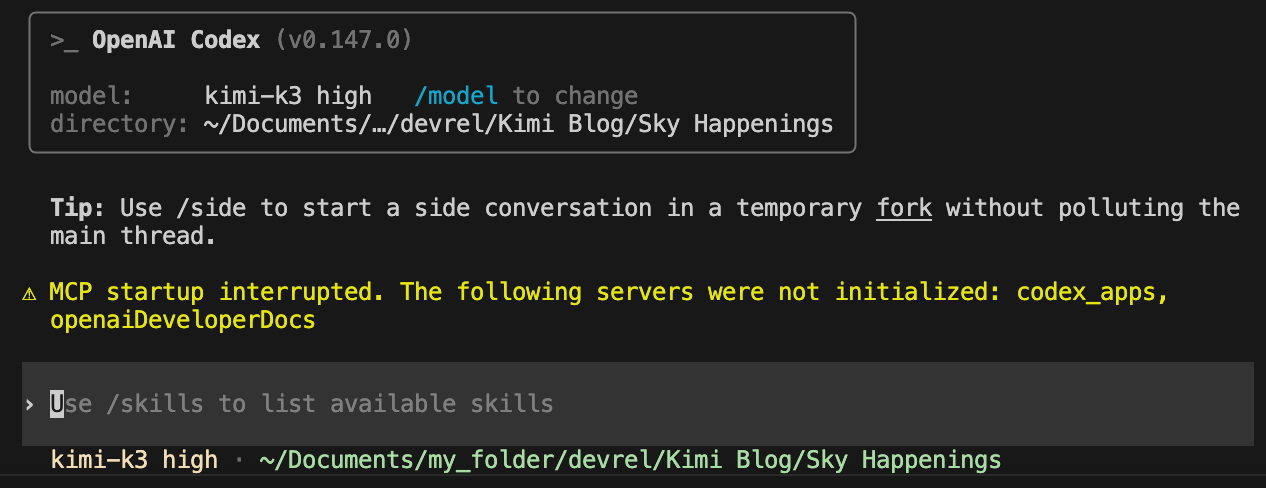
That’s it. Claude Code and Codex work as the coding harness, while Kimi K3 runs through Fireworks.
6. Kimi K3 vs Opus 5 and GPT-5.6: Quality, Speed, and Cost
Now let us see how Kimi K3 performs in a real web development task.
For this test, I gave the same web development prompt to Kimi K3, Claude Opus 5, and GPT-5.6 Sol.
I asked each model to build a web app called Skywatch. We can select a date in the app and see the sky events happening on that day.
The app should have an animated landing page, date navigation, and details about each event. For now, I asked the models to use mock data. Later, it can be replaced with a real API.
Kimi K3
Kimi K3 built the app with HTML, CSS, and JavaScript. It didn’t use any external dependencies.
The UI came out clean and animated. It was also easy to use. Kimi opened the app in the browser and tested the UI visually.
Kimi K3 took 16 minutes and 45 seconds to complete the task. The usage page showed a cost of around $2.49.
Claude Opus 5
I then gave the same prompt to Opus. It built the app with React, TypeScript and Vite. It added more features like an interactive calendar, event filters, and a separate section for moon-phase details. It also added accessibility support and handled different UI states.
I checked the usage and it had used more tokens and cache reads. It worked around 24 mins and the cost was around $13.38.
GPT-5.6 Sol
GPT-5.6 Sol produced the strongest visual design in this test. The cinematic hero section, animation, spacing, and overall visual hierarchy made the app feel more polished.
It also finished the fastest, taking 11 minutes and 42 seconds. The estimated cost was around $3.67.
Here is the complete comparison.
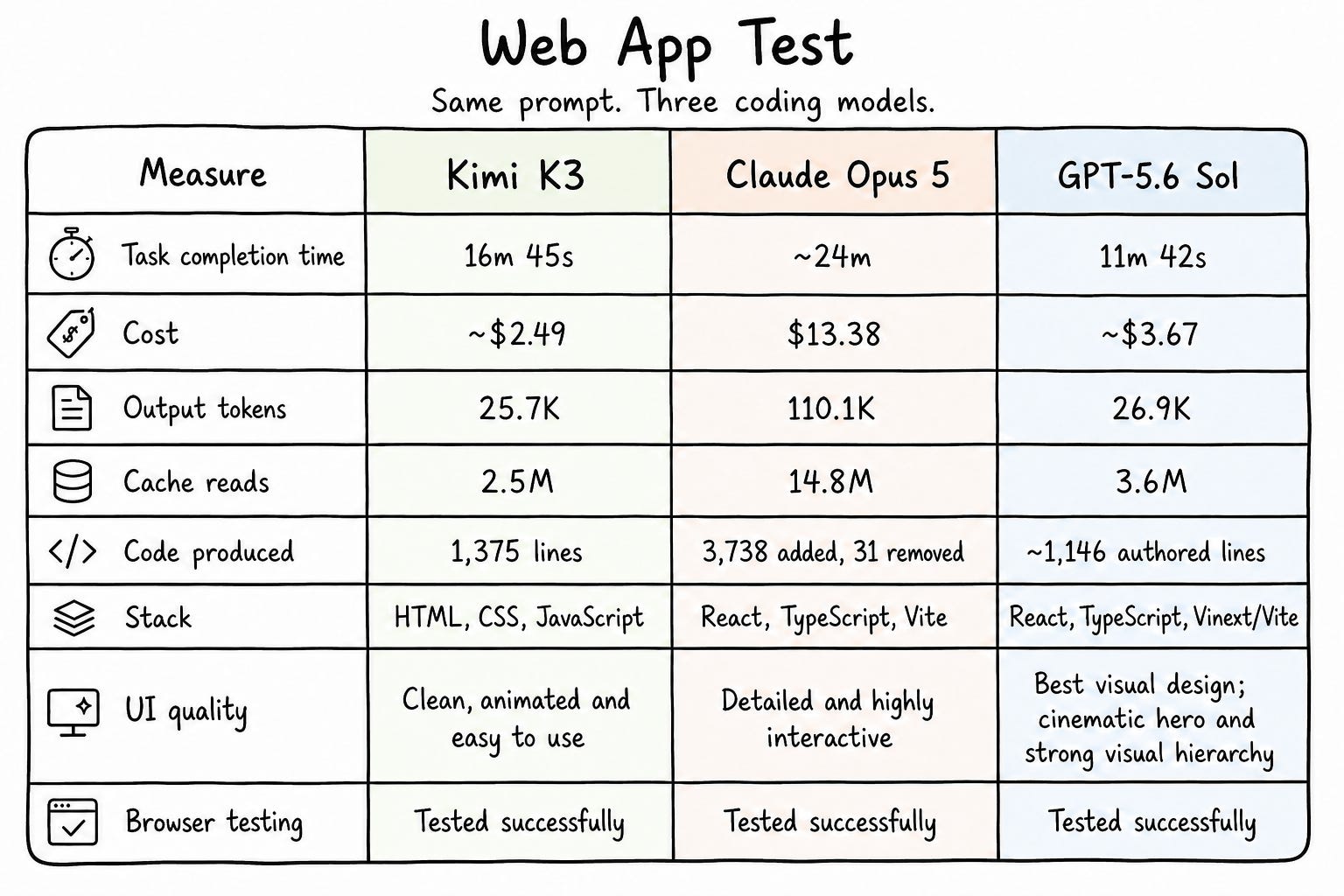
As you see in the table above, Kimi finished the task faster and the cost was very lower when compared to Opus.
Opus built the app in a more detailed and interactive way. I would say it built a complete app. But cost was higher.
Among the three GPT 5.6 Sol was faster and lower cost. And the UI built by GPT-5.6 Sol was really amazing when compared to other two.
Conclusion
Hope you now got a good idea about Kimi K3 and how it works.
Kimi K3 is a big model. But size is not the only interesting part here. Moonshot built a 2.8T model and still kept the inference cost lower.
In my coding test also, Kimi performed well. Almost equal to Opus, but faster and much cheaper.
So yes, Kimi K3 is worth trying.
Happy Building!