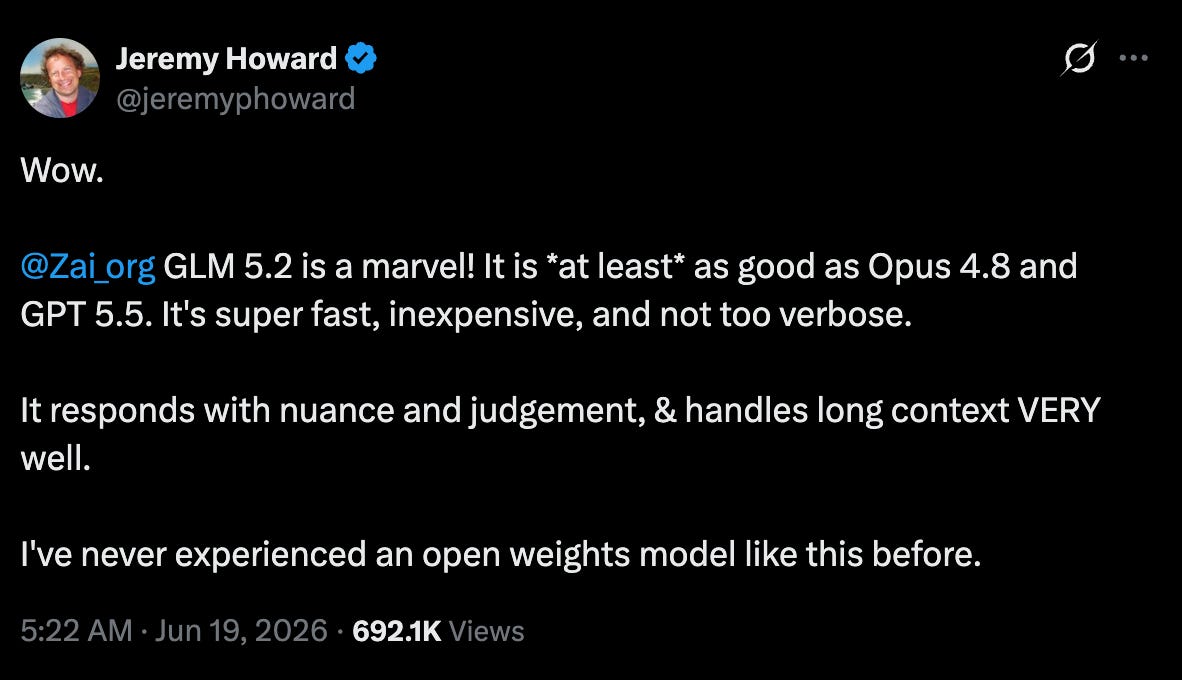
People are already comparing it directly with Opus 4.8 on quality. The interesting part is the price. GLM 5.2 is much cheaper per token, so I wanted to test how close it really gets.
I ran GLM 5.2 and Opus 4.8 inside Claude Code across five real developer tasks. I found some interesting insights in each test. Here is what this post covers.
GLM 5.2 and Opus 4.8: An Overview
Setting up GLM 5.2 inside Claude Code
GLM 5.2 vs Opus 4.8 in Claude Code
Test 1: One-shot UI build
Test 2: Debug a failing test
Test 3: Fixing a performance bottleneck
Test 4: Refactoring codebase
Test 5: A multi-step research task, with sub-agents
Key Insights from Tests
Dev Shorts is a reader-supported publication. To receive new posts and support my work, consider becoming a free or paid subscriber.
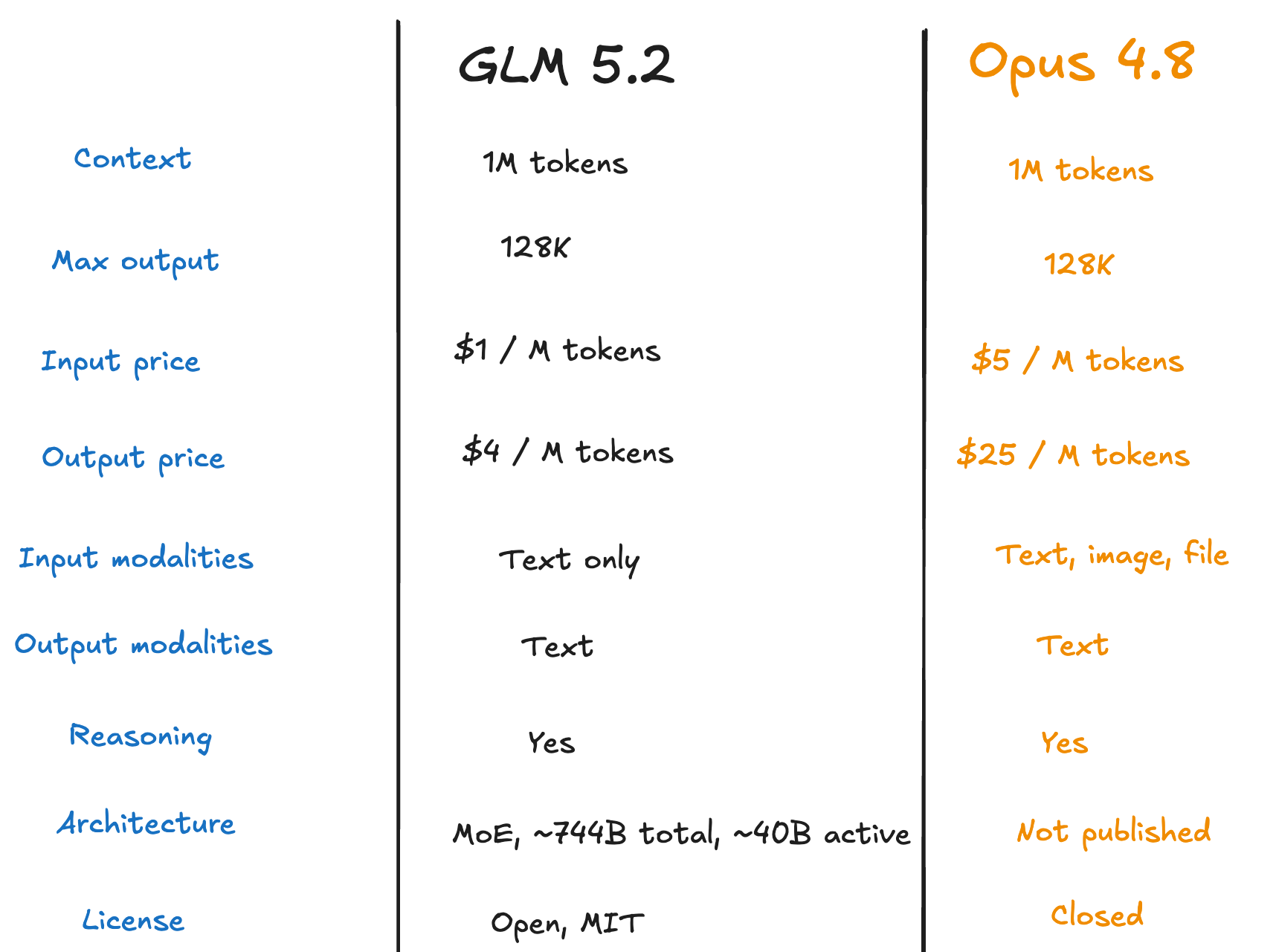
1. GLM 5.2 and Opus 4.8: An Overview
Knowing the difference, let’s do the real tests and see how both perform.
2. Setting up GLM 5.2 inside Claude Code
Claude Code is a harness, and any custom model can be set up inside it.
You can use GLM 5.2 from any inference provider. If you are using Z.ai, here is how to set it up in Claude Code. Get an API key from Z.ai's platform. Then edit ~/.claude/settings.json and add this. (Full docs here)
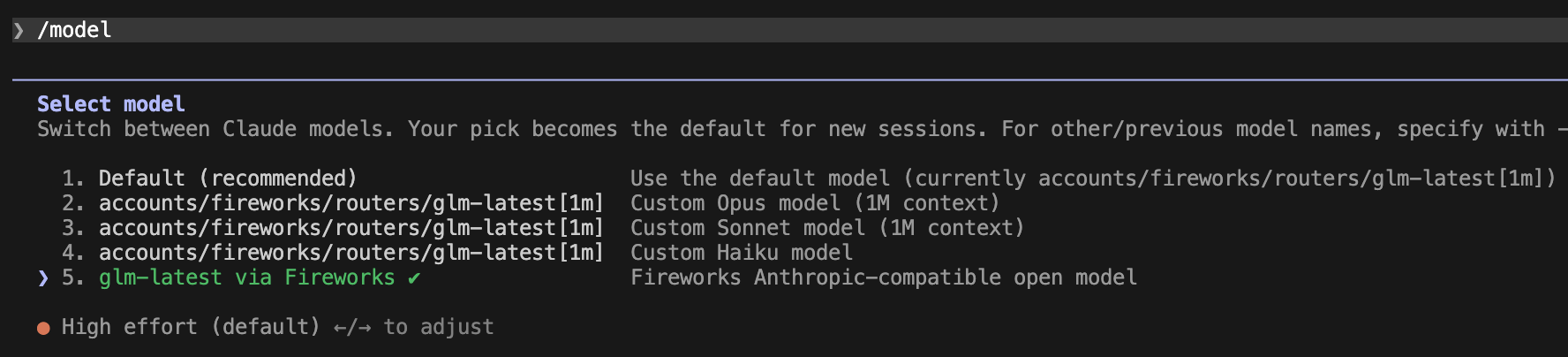
This gets GLM running inside Claude Code. But by default it maps to GLM-4.7, not 5.2. To actually run GLM 5.2, with the full 1M context window, add this too.
The [1m] suffix enables the full 1M context. Without it, you get the default context window, not 1M.
GLM 5.2 uses 3x your quota during peak hours, 2x during off-peak.
Run /status in Claude Code to confirm which model you are on.
This setup is for Z.ai. If you are using a different provider, the config will be different.
If you are using GLM model from Fireworks AI, they have their own way of integrating it, check their documentation. Same goes for OpenRouter, the steps are different, so follow what your provider docs say.
For Fireworks AI - GLM 5.2 integration, run below commands.
curl -fsSL https://raw.githubusercontent.com/fw-ai/fireconnect/main/install.sh | FIREWORKS_API_KEY="fw_xy”z bash

fireconnect claude on --api-key fw_xyz
3. GLM 5.2 vs Opus 4.8 in Claude Code
Now let us get into the tests. I ran both models on the same tasks, same prompt, same codebase.
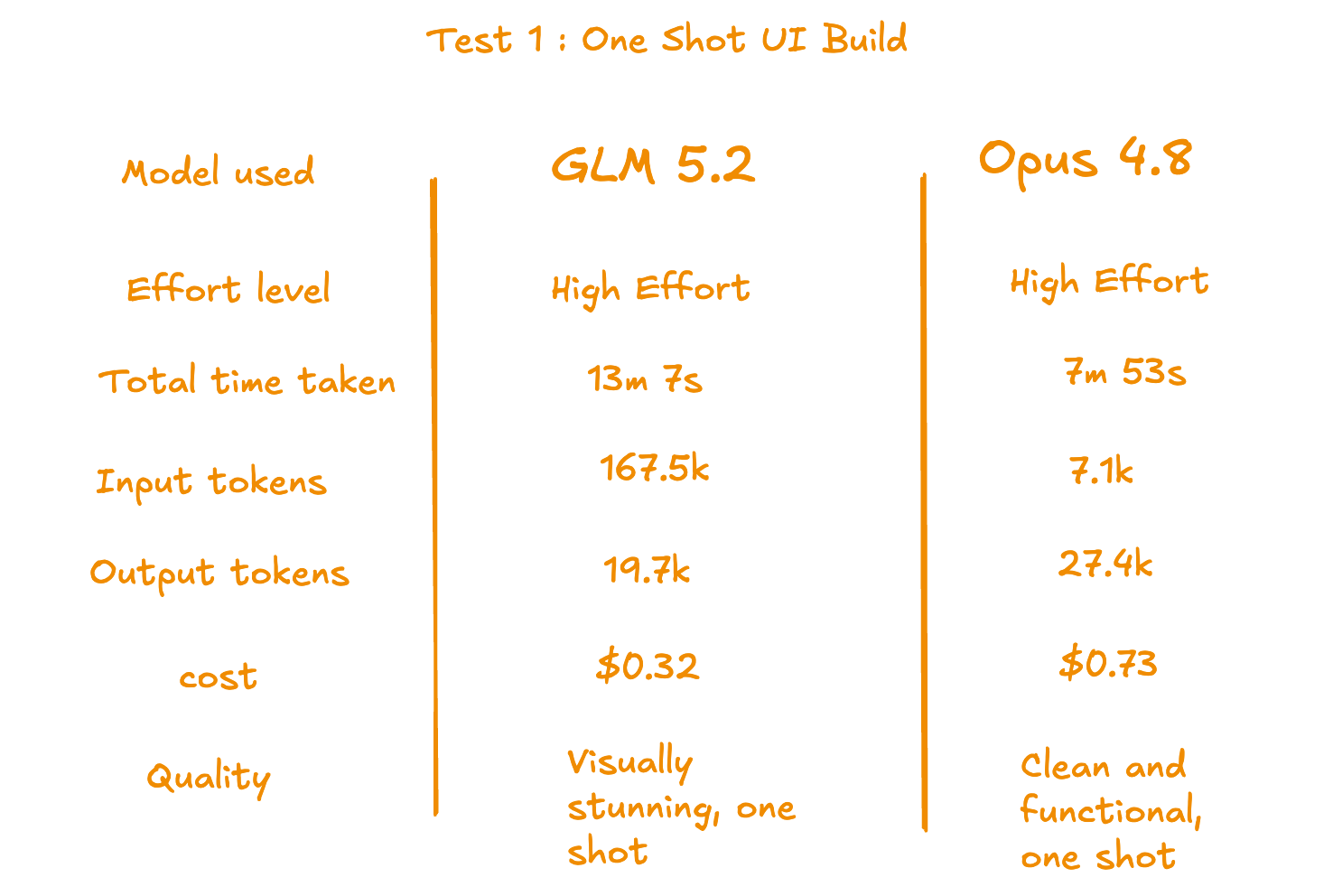
Test-1: One-shot UI build
The first test is a one-shot UI build. I gave the same prompt to both models to see what they build, without any follow-ups.
Prompt Given:
Build a Northern Lights tracker. Purely frontend, mock data is fine.

It should show the best viewing locations for tonight, visibility forecast by hour, and a KP index indicator. When visibility is high, the interface should feel like it.

The design is the real test here. Auroras are one of the most visually stunning things on the planet. The UI should reflect that. Animations, atmospheric gradients, a dark sky feel. Not a weather app with a green badge. Something that actually makes you want to look up.

Use whatever stack and libraries make sense. Install what you need.

Build it end to end and verify it runs in the browser before stopping. No clarifying questions.
Both built something impressive in one shot.
What GLM 5.2 Built
GLM built the visually stronger UI. Full-screen aurora waves, bold hero text, rich location cards. It feels alive as you scroll.
The only thing it needs is a small fix on the hero animation speed. The waves move too fast and the text gets buried. One prompt, and it is right there with Opus.
What Opus 4.8 Built
Opus built a clean, functional dashboard. Structured layout, clear hierarchy, each section separated and easy to scan. Complete UI, up and running in one shot.
What I noticed:
Both delivered impressive UIs in one shot.
Opus was clean and complete with no issues out of the box.
GLM was visually stronger but needed one small fix on the animation speed.
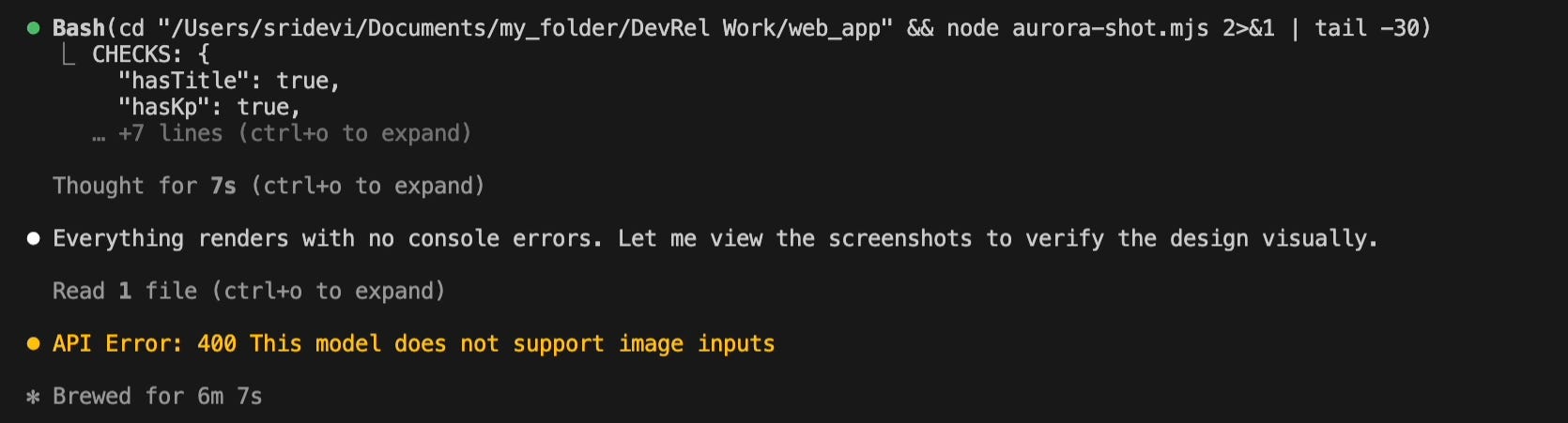
One thing worth noting. GLM does not support image input, so it could not verify the UI in the browser the way Opus did. Opus used the browser tool to check its own output. GLM had to skip that step.
On the numbers, GLM used more tokens and took a bit longer than Opus. But the token cost is lower, so the final bill was still significantly cheaper. Almost equal quality to Opus, at a fraction of the price.
Now, here is the remaining details
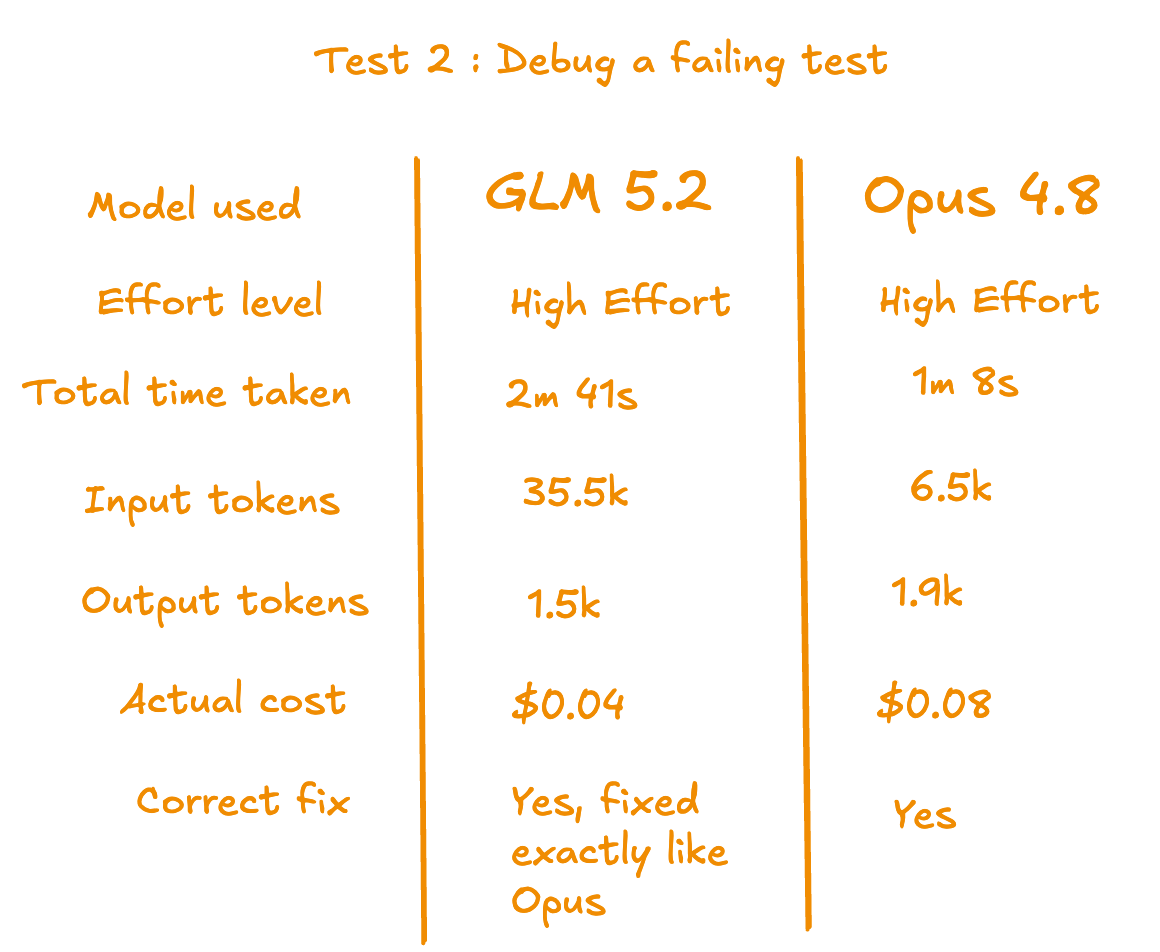
Test 2: Debug a failing Test
npm test was failing. That was the whole prompt. No hints, no file names, no description of what is wrong.
Prompt Given:
npm test is failing. fix it
The real question here is whether the model can identify the root cause correctly. One failure was a real bug in the implementation. The other was a wrong assertion in the test. Each needed a different kind of fix.
What Opus 4.8 did
Opus went straight to it. Ran the tests, read the files, fixed both issues correctly. Knew exactly where to look and what to change. Clean and done.
What GLM 5.2 did
GLM took a more thorough approach. It read more context before acting and ran a shell command to verify the fix before wrapping up. Same correct fixes as Opus, but more steps and time to get there.
What I noticed:
Opus got there faster and with fewer tokens, clean and direct.
GLM found failing tests and fixed them correctly, same as Opus. Same diagnosis, same fixes.
GLM read significantly more context, 35.5k input tokens vs Opus 6.5k. It took a more thorough path before committing the fix.
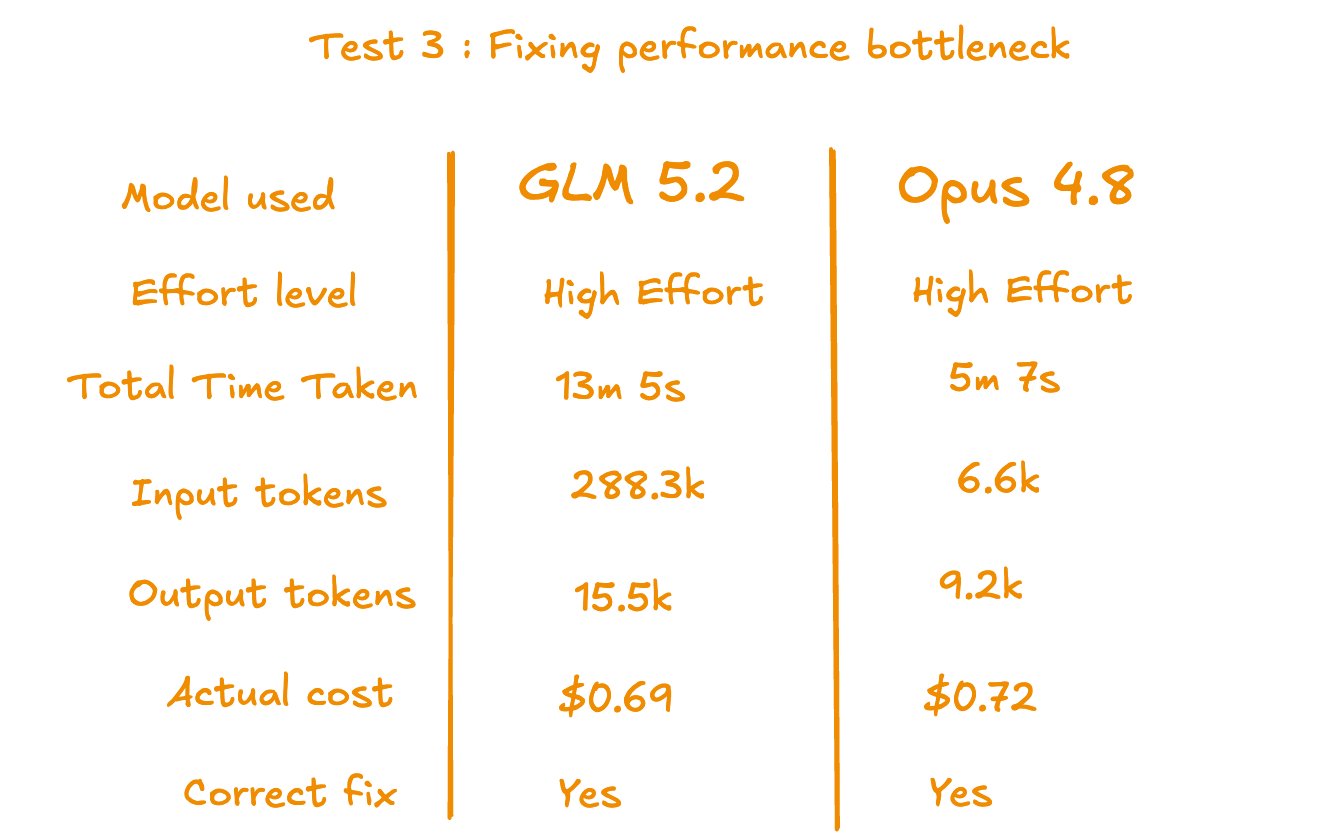
Test 3: Fixing performance bottleneck
I gave both models a user complaint and a file path.
Prompt Given:
Users are reporting that the issues list loads slowly when a project has a lot of data.

The backend entry point is src/services/issueService.ts.
Find the bottleneck and fix it.
The actual issue was a query doing redundant work for every row it processed, with no indexes to speed it up. Fine on small data, but slow on large ones. Exactly what users were reporting.
Both models proposed the same two-layer fix. Rewrite the query, add indexes.
The difference was execution.
What GLM 5.2 did
GLM diagnosed it correctly and went deep into benchmarking. It even caught that its own rewrite was slower than expected and re-evaluated. But the investigation loops kept going, so I stepped in and asked it to wrap up. It gave the right fix, but burnt more tokens and time.
Here is where it caught its own mistake.
What Opus 4.8 did
Opus read the files, wrote the fix, verified it, and wrapped up in 5 minutes. Clean, done.
What I noticed:
Both models proposed the same fix. Rewrite the query and add indexes. Same diagnosis, same solution.
GLM went deeper than needed. It caught that its own rewrite was slower than expected and kept re-evaluating. Good reasoning, but the investigation loops ran too long. I had to step in and ask it to wrap up. Finally it gave the right answer.
Opus read the files, wrote the fix, verified it with the sqlite3 CLI, and wrapped up in under 5 minutes.
GLM burned significantly more tokens to reach the same conclusion.
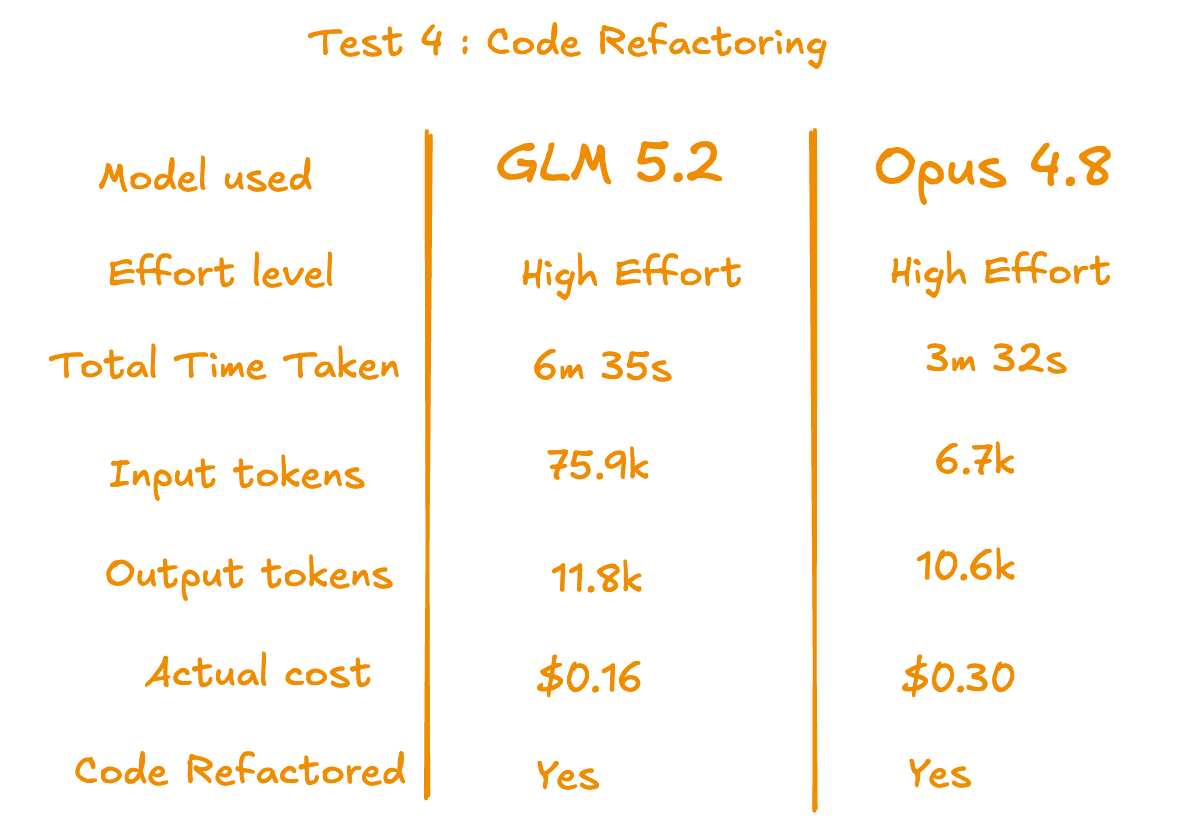
Test 4: Refactoring Codebase
This test is about giving both models a messy file and seeing how they clean it up, without telling them what is wrong.
Prompt given:
file issueService.ts is getting messy. Clean it up.
Both models read the file, identified the same problems and refactored the same way.
The difference was execution speed.
What Opus 4.8 did
Opus read the file, made the changes, ran the compiler to verify, and wrapped up in 3 minutes 32 seconds. Clean and done.
What GLM 5.2 did
GLM also cleaned in the same way. But it took more steps and time to get there.
What I noticed
GLM 5.2 reasoning is as high as Opus 4.8. Just like every other test, it consumed more token and time.
Opus flagged two edge cases it changed that were not part of the original request and asked if you want to keep them. That kind of communication is useful in a real codebase.
Test 5: A multi-step research task, with sub-agents
Both models performed really well on this research task.
Prompt given:
Research the latest agentic frameworks that support multi-agent orchestration.

Find:
- Which ones are actively maintained
- What the developer community thinks of each one
- How they compare on ease of use, flexibility, and production readiness

Give me a comparison table and a recommendation on which one to start with.
What Opus 4.8 did
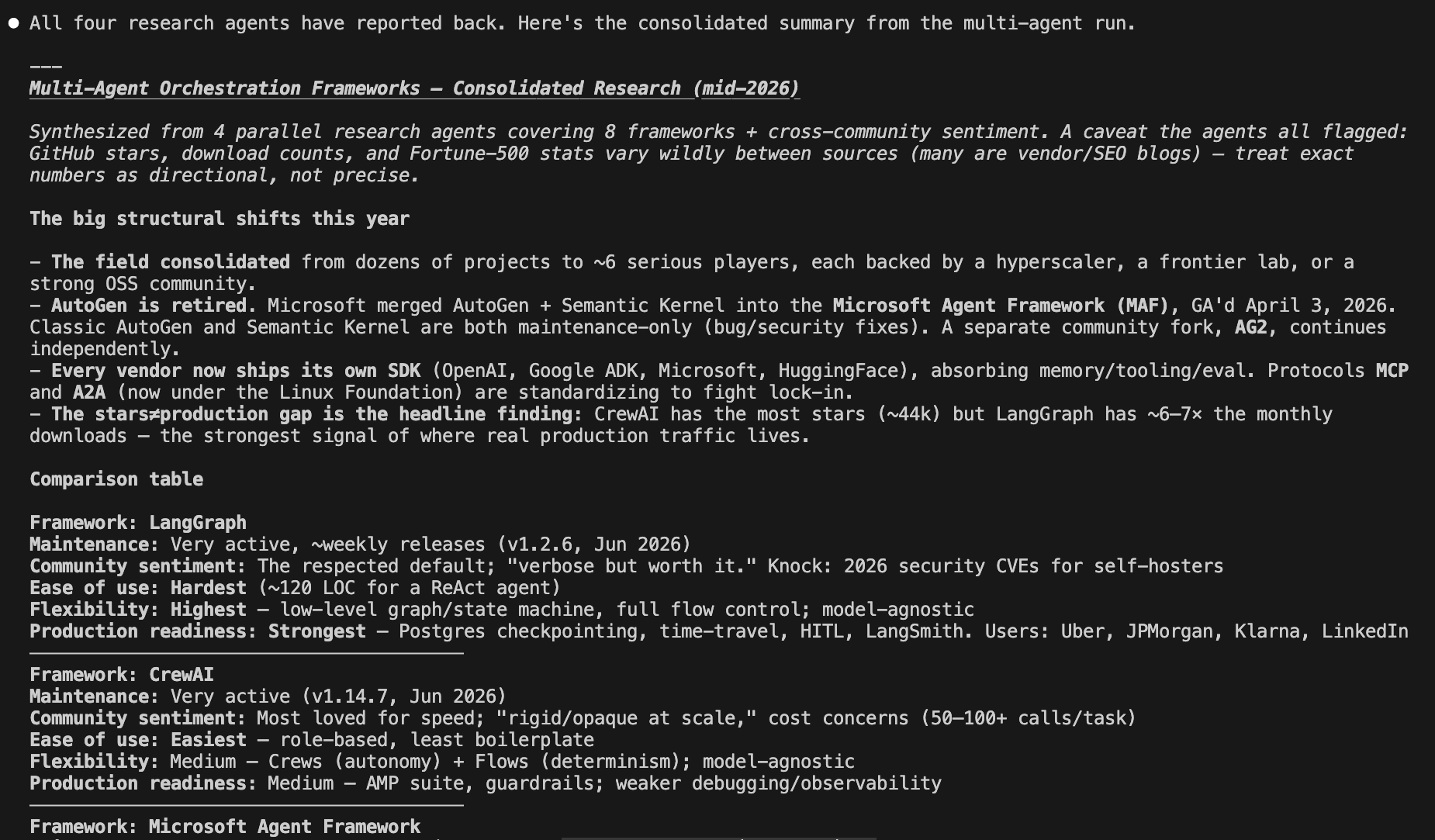
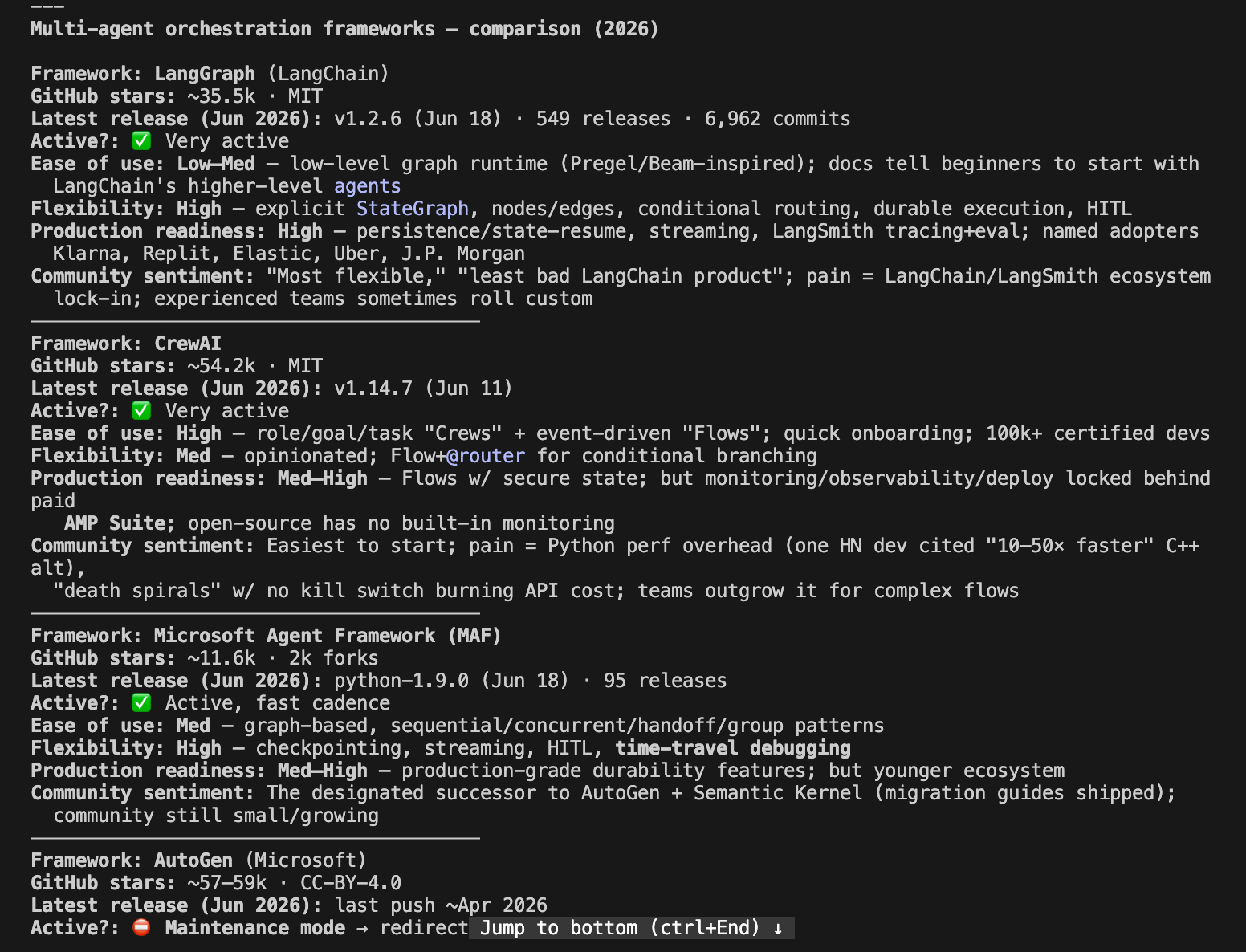
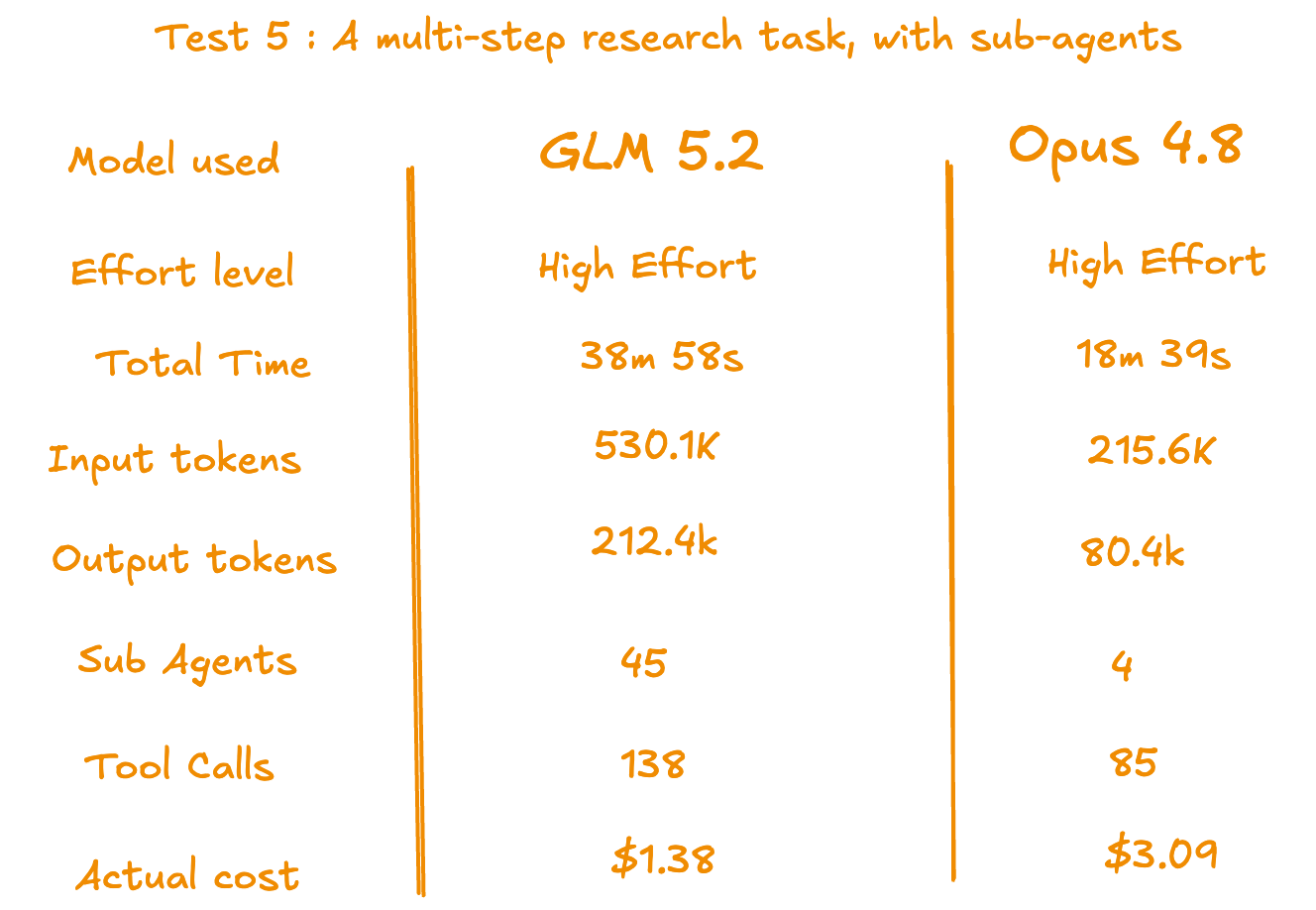
Opus ran 46 web searches, used sub-agents, and came back with a structured comparison table, community sentiment per framework, version numbers, enterprise users, and a clear recommendation with reasoning.
What GLM 5.2 did
GLM went deeper than Opus. It used more iterations, more tool calls, more web searches, and spawned more sub agents. It consumed significantly more tokens,
But the final result was at Opus level.
What I noticed
Both reached the same findings, same reasoning, same recommendation.
Opus stayed focused and got there efficiently. GLM went wider but arrived at the same place.
The cost difference comes down to how each model works, not the quality of the output.
For deep research tasks, GLM’s cheaper token cost is an advantage. It can afford to go wider without the bill getting out of hand.
4. Key Insights from Tests
GLM 5.2 is genuinely good. The reasoning is there. The quality is there. In most tests it reached the same answer as Opus. It is really great to see an open weight model performing at this level, matching Opus on quality.
But it consumes more token, and takes more time for many tasks. It goes wider and deeper than needed. In Test 3, it went so deep into benchmarking its own fix that it took longer than expected.
Opus, just like always more focused. It builds efficiently and moves on.
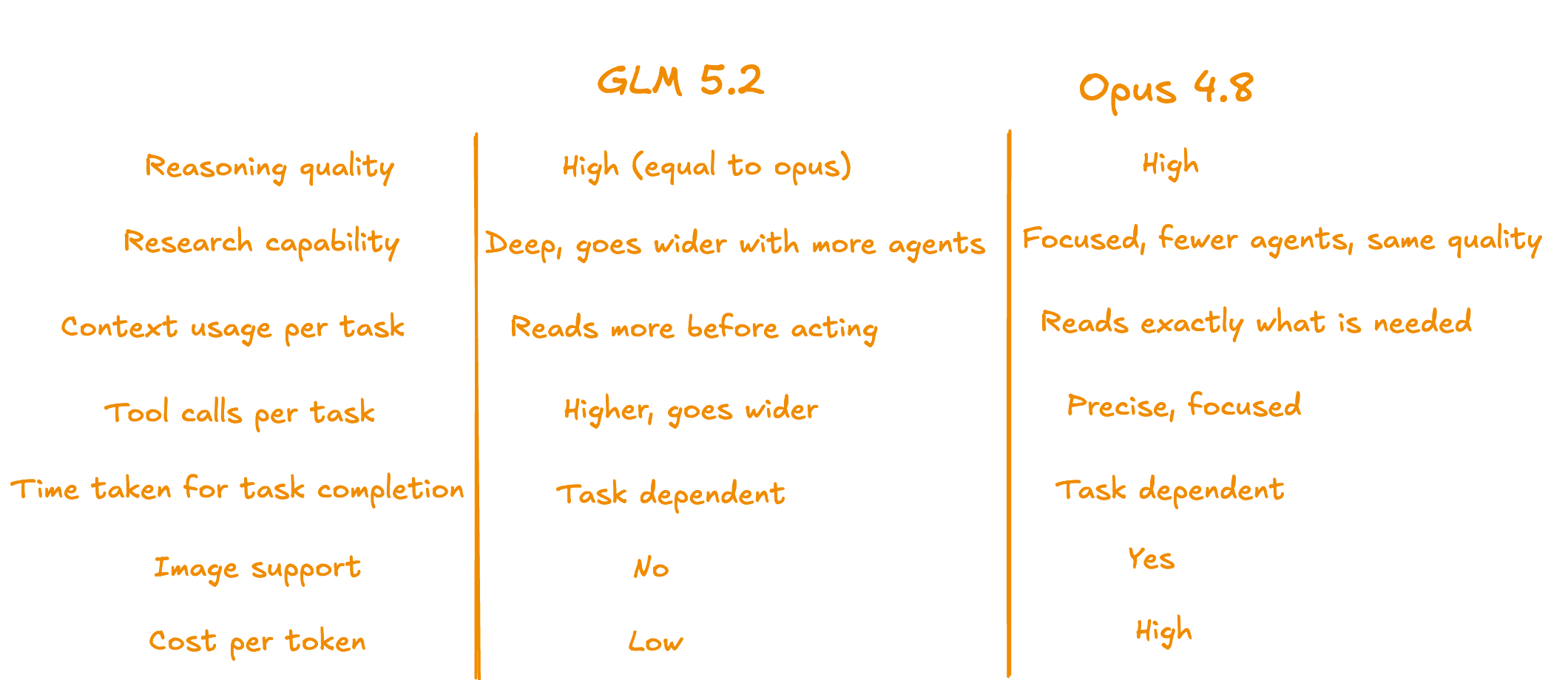
Across five tests, here is how they compare overall.
These results are based on my own tests, not any official claims or vendor comparisons. Your results may vary depending on the task and provider.
One thing worth noting. Every test here was run on high effort. At that level, GLM matched Opus consistently. Whether it holds up the same way on medium effort is still untested.
GLM 5.2 is closer to Opus 4.8 than most people think. And significantly cheaper.
I hope this blog gives you a clear picture of where GLM 5.2 stands and whether it is worth adding to your workflow. If you are already on a Claude subscription, setting up GLM alongside it takes five minutes. Start with one task and see how it feels.
Happy building.
Thanks for reading Dev Shorts! This post is public so feel free to share it.