

We all know Thinking Machines Lab by now. When Mira Murati, OpenAI’s former CTO, started this company, many people were curious about what they would build first.
They started with Tinker.
Tinker is an API for fine tuning large language models. The idea behind it is simple. You control the training logic. This includes your data, loss functions, and training loop. Tinker takes care of the hard parts like distributed GPU training, scheduling, and system reliability.
In simple terms, Tinker helps you fine tune models without worrying about infrastructure, while still giving you full control.
In this blog, I walk through:
What is Tinker
Why Tinker
Finetuning DeepSeek V3 with Tinker
Inference and Deployment Options
1. What is Tinker
Tinker is an API for fine tuning large language models.
Fine tuning means taking an existing model and training it on your own data. This is how a model learns a new style or task.
With Tinker, you still write the training logic. You decide how data is loaded, how loss is calculated, and how the training loop runs.
But you do not have to manage the infrastructure. You call the Tinker API from your local machine, and the training runs on Tinker’s GPUs.

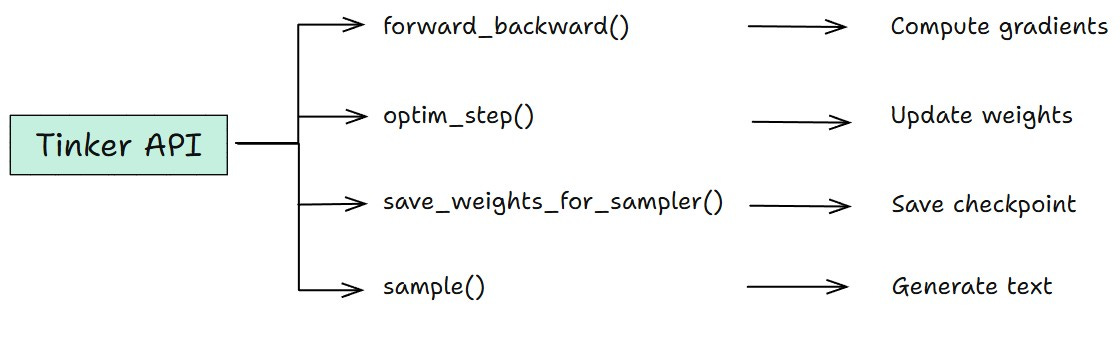
The Tinker API has four functions:
2. Why Tinker
Fine-tuning LLMs typically falls into two extremes.
Manual fine-tuning
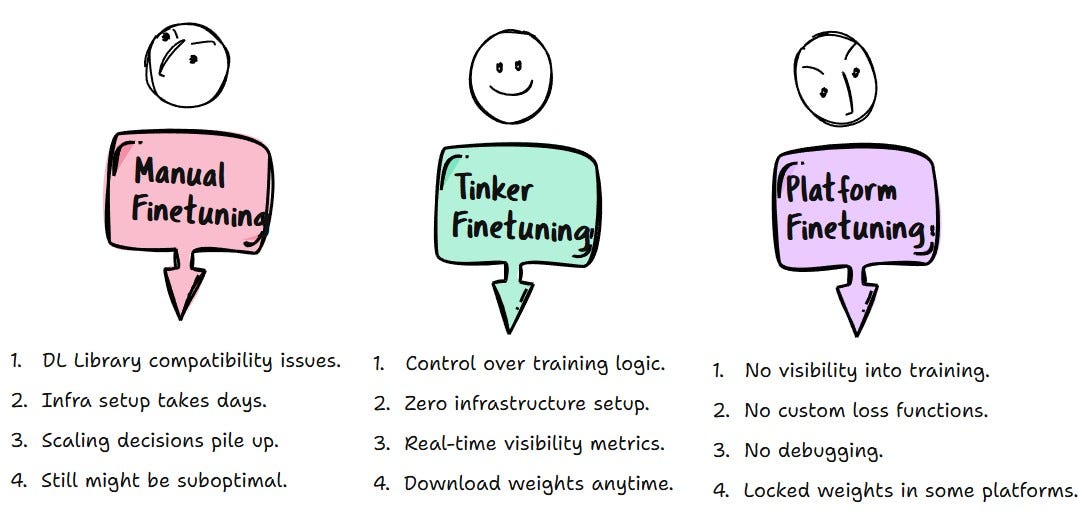
It gives you complete control. Your GPUs. Your CUDA setup. Your choice of libraries and optimizers. Every knob is yours to turn.
But so is every failure. Every compatibility issue. Every hour spent on infrastructure instead of actual training.
Platform-based fine-tuning:
It offers simplicity. just upload a dataset, click train, download weights. No infrastructure to manage, no code to write.
But you’re locked out of the training process entirely.
Tinker: The Middle Ground
Tinker fits in the right sweet spot between Manual Finetuning and Platform based Finetuning. It gives you control where it matters.
You define the datasets, loss functions, and training loops. Tinker handles the infrastructure headache like GPU setup, Distributed training, Memory management and Hardware failures.
Tinker gives you full control over fine-tuning without the infrastructure tax.
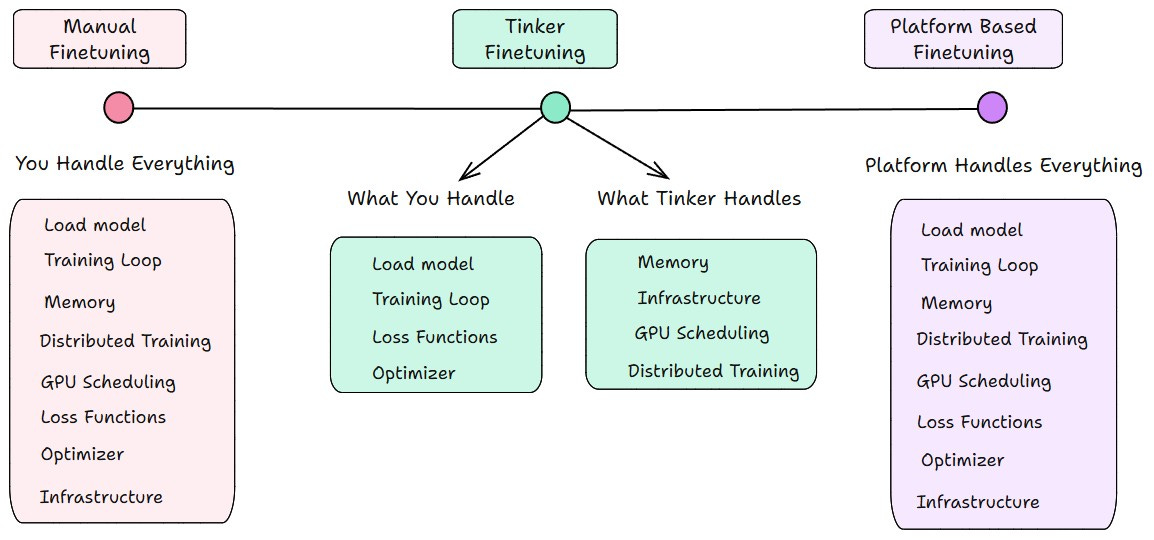
Both extremes come with some disadvantages, which makes Tinker Existence Valuable.
3. Finetuning DeepSeek V3 with Tinker API
Now let us finetune DeepSeek Model with Tinker API.
I send out the Dev Catch Up newsletter every week. Each item follows a clear style. It is short, simple, and focused on what actually matters. I read AI updates and releases, then rewrite them in my own voice.
I wanted to see if DeepSeek could learn this style.
So, I fine-tuned the model on my newsletter data. After training, it started picking up the Dev Shorts tone. Simple and Short sentences. No unnecessary hype.
Before fine tuning, the base model behaves like most LLMs. It uses bullet points, emojis, and phrases like “game changer” or “massive upgrade”. That is not how I write.

Let us now fine tune it step by step and see how the output changes.
Step 1: Install Tinker
!pip install tinker
!pip install torch
!pip install tinker_cookbook
Step 2: Set Your API Key
import os
os.environ["TINKER_API_KEY"] = "your-api-key-here"
Step 3: Import necessary packages
Tinker is the core training API. It runs the training on managed infrastructure.
Tinker Cookbook is an optional helper library. I am using it here for tokenization, chat formatting, and dataset conversion.
If you want, you can write tokenization and the rest from scratch without using Cookbook and work directly with the Tinker API.
import json
import time
import tinker
import torch
from tinker import types
from tinker_cookbook import renderers
from tinker_cookbook.supervised.data import conversation_to_datum
from tinker_cookbook.renderers import TrainOnWhat
from tinker_cookbook.tokenizer_utils import get_tokenizer
from tinker_cookbook import model_info
from tinker_cookbook.supervised.common import compute_mean_nll
Step 4: Connect to Tinker and see available models:
service_client = tinker.ServiceClient()
capabilities = service_client.get_server_capabilities()

print(”Available models:”)
for model in capabilities.supported_models:
    print(f”  {model.model_name}”)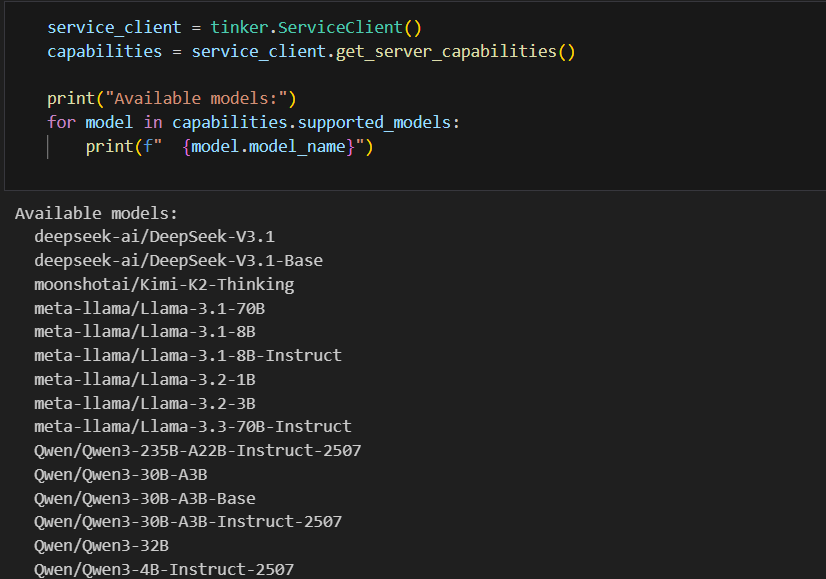
Step 5: Select the base model to finetune
MODEL_NAME = “deepseek-ai/DeepSeek-V3.1”This is the base model we are going to fine-tune. The model's name must match one of the available models returned by the Tinker API.
Step 6: Configure LORA Finetuning Parameters
BATCH_SIZE = 8
LEARNING_RATE = 2e-5
LORA_RANK = 32
MAX_LENGTH = 4096
NUM_EPOCHS = 10
LEARNING_RATE = 2e-5is0.00002. - Start conservative for large models.
LORA_RANK = 32- Controls the adapter size. Higher means more capacity but slower training.
NUM_EPOCHS = 10- means model go through the dataset 10 times.
Step 7: Load Tokenizer and Renderer
tokenizer = get_tokenizer(MODEL_NAME)
renderer_name = model_info.get_recommended_renderer_name(MODEL_NAME)
renderer = renderers.get_renderer(renderer_name, tokenizer)
The tokenizer converts text into tokens. The renderer defines how chat messages are formatted before they are sent to the model.
Step 8: Prepare the Dataset for Training
My dataset is a JSONL file.
The user message contains raw content scraped from release pages. The assistant message contains the Dev Shorts newsletter style.
I prepared around 100 rows in total. Each row follows this format. For this walkthrough, I am using a small sample of 16 rows.
{
"messages": [
{
"role": "user",
"content": "Rewrite in Dev Shorts newsletter style.
We are introducing GPT‑5.2, the most capable model series yet for professional knowledge work.
Already, the average ChatGPT Enterprise user says AI saves them 40–60 minutes a day, and heavy users say it saves them more than 10 hours a week. We designed GPT‑5.2 to unlock even more economic value for people; it’s better at creating spreadsheets, building presentations, writing code, perceiving images, understanding long contexts, using tools, and handling complex, multi-step projects.
GPT‑5.2 sets a new state of the art across many benchmarks, including GDPval, where it outperforms industry professionals at well-specified knowledge work tasks spanning 44 occupations."
},
{
"role": "assistant",
"content": "OpenAI has launched GPT 5.2. It is better at creating spreadsheets, building presentations, writing code, understanding images. It can work with long context. It also uses tools more effectively and handles multi-step work with more accuracy. Read OpenAI’s GPT 5.2 post for more details."
}
]
}
Step 9: Load the Dataset
DATASET_PATH = "dataset.jsonl"

training_data_raw = []
with open(DATASET_PATH, "r") as f:
    for line in f:
        training_data_raw.append(json.loads(line.strip()))

print(f"Loaded {len(training_data_raw)} examples")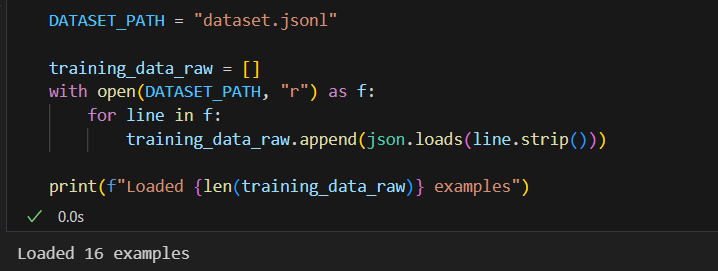
Step 10: Convert the data to training format
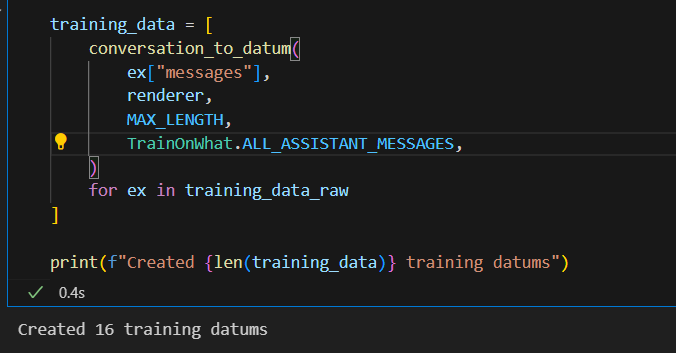
conversation_to_datum - This function converts each conversation into a format Tinker can use for training.
TrainOnWhat.ALL_ASSISTANT_MESSAGES - It tells Tinker to only learn from assistant responses, not user messages.
training_data = [
    conversation_to_datum(
        ex["messages"],
        renderer,
        MAX_LENGTH,
        TrainOnWhat.ALL_ASSISTANT_MESSAGES,
    )
    for ex in training_data_raw
]
Step 11: Create Training Client
training_client = service_client.create_lora_training_client(
    base_model=MODEL_NAME,
    rank=LORA_RANK,
)

print("Training client created")
Step 12: Train the Model
Tinker has 4 core functions. The training loop uses two of them.
forward_backward()- compute gradientsoptim_step()- update weights
n_batches = len(training_data) // BATCH_SIZE

for epoch in range(NUM_EPOCHS):
    print(f"\nEpoch {epoch + 1}/{NUM_EPOCHS}")

    for batch_idx in range(n_batches):
        t_start = time.time()

        # Learning rate decay
        step = epoch * n_batches + batch_idx
        total_steps = NUM_EPOCHS * n_batches
        lr_mult = max(0.0, 1.0 - step / total_steps)
        current_lr = LEARNING_RATE * lr_mult

        adam_params = types.AdamParams(
            learning_rate=current_lr,
            beta1=0.9,
            beta2=0.95,
            eps=1e-8,
        )

        # Get batch
        batch_start = batch_idx * BATCH_SIZE
        batch_end = batch_start + BATCH_SIZE
        batch = training_data[batch_start:batch_end]

        # Training step
        fwd_bwd_future = training_client.forward_backward(batch, loss_fn="cross_entropy")
        optim_step_future = training_client.optim_step(adam_params)

        fwd_bwd_result = fwd_bwd_future.result()
        optim_step_future.result()

        # Compute loss
        logprobs = [out["logprobs"] for out in fwd_bwd_result.loss_fn_outputs]
        weights_list = [d.loss_fn_inputs["weights"] for d in batch]
        mean_nll = compute_mean_nll(logprobs, weights_list)

        elapsed = time.time() - t_start
        print(f"  Batch {batch_idx + 1}/{n_batches} | NLL: {mean_nll:.4f} | LR: {current_lr:.2e} | Time: {elapsed:.2f}s")

print("\nTraining complete")
The loss (NLL) should decrease as training progresses.
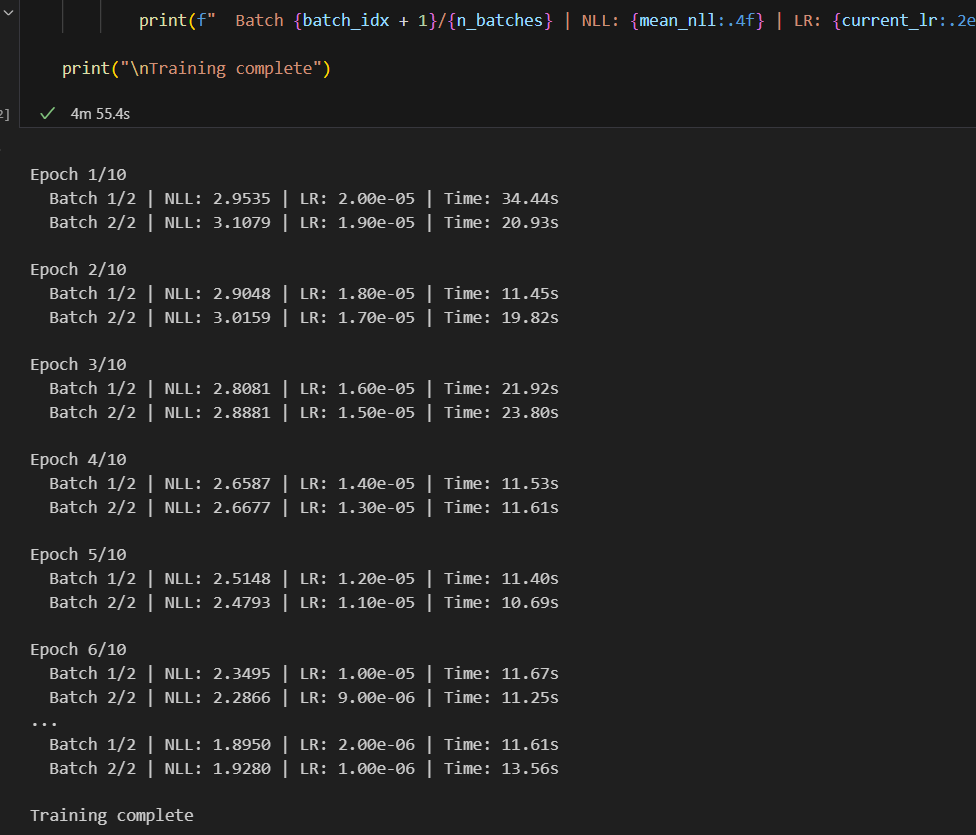
Note: The dataset size and epochs shown here are for demonstration. I actually finetuned with more rows and higher epochs to get the model to pick up the style properly.
Step 13: Save Checkpoint
This uses Tinker's third function.
save_weights_for_sampler() - It stores the checkpoint on Tinker's servers.
final_path = training_client.save_weights_for_sampler(name="final").result().path
print(f"Final checkpoint: {final_path}")
Step 14: Test the Finetuned Model
Finally, test the finetuned model using Tinker’s fourth function- sample().
test_client = service_client.create_sampling_client(model_path=final_path)

test_input = (
    "The Gemma is a family of generative AI models designed for tasks like question answering, summarization etc. It is a family of open models from Google. Gemma recently crossed 100 million downloads and has a growing community with tens of thousands of model variants created by developers. Google has now introduced Gemma 3, a new set of lightweight open models built on the same research used for Gemini 2.0. These models are designed to run efficiently on devices like phones, laptops, and workstations. Gemma 3 is available in multiple sizes including 1B, 4B, 12B, and 27B. Gemma 3 supports text and image reasoning, a 128k token context window, function calling, and structured outputs. It also offers support for more than 140 languages and includes official quantized versions to improve performance while reducing compute requirements."
)

STYLE_PREFIX = (
    "Rewrite in Dev Shorts newsletter style."
)

convo = [
    {
        "role": "user",
        "content": STYLE_PREFIX + "\n\n" + test_input
    }
]

model_input = renderer.build_generation_prompt(convo)

result = test_client.sample(
    prompt=model_input,
    num_samples=1,
    sampling_params=types.SamplingParams(
        max_tokens=200,
        stop=renderer.get_stop_sequences(),
        temperature=0.2,
    ),
).result()

parsed_message, _ = renderer.parse_response(result.sequences[0].tokens)
output = parsed_message["content"]

print("INPUT:")
print(test_input)
print("\nOUTPUT:")
print(output)
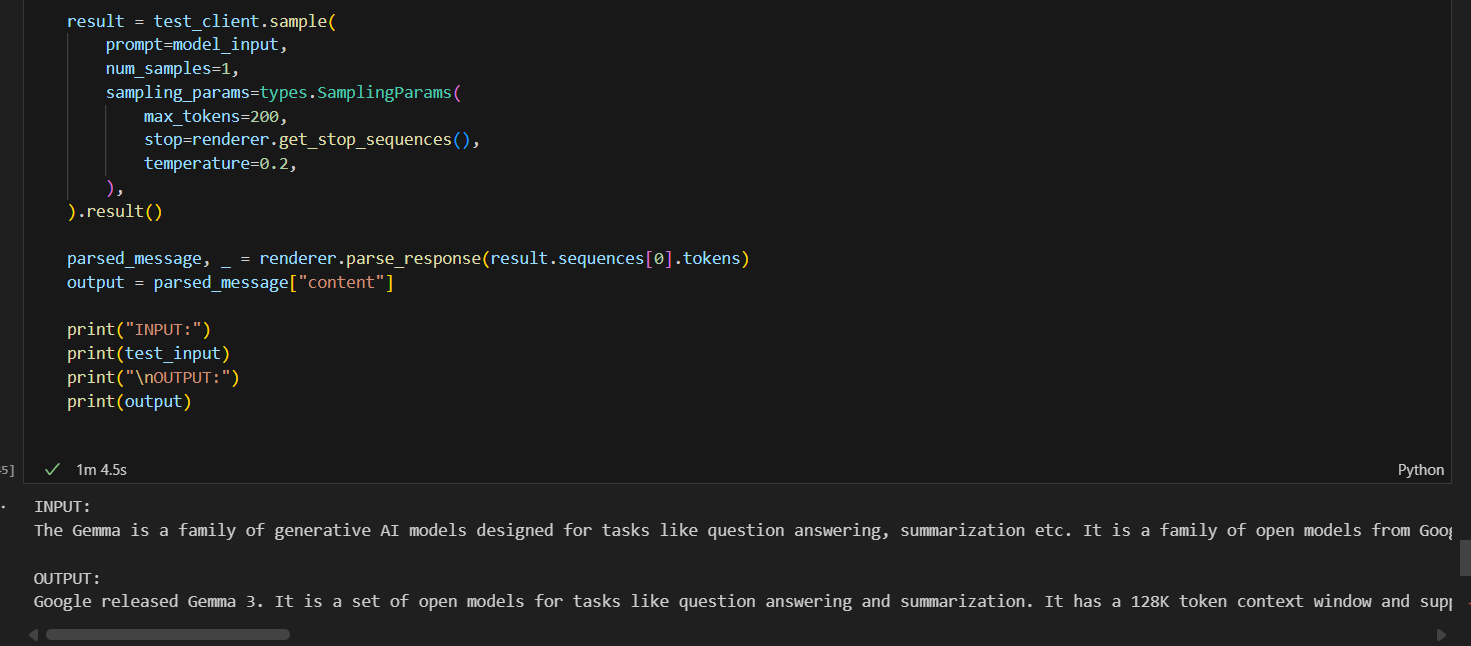
The finetuned model writes in the style we finetuned.
Output:
Google released Gemma 3. It is a set of open models for tasks like question answering and summarization. It has a 128K token context window and supports text and image reasoning. It is designed to run on phones, laptops, and workstations. It supports over 140 languages. Check Google’s Gemma 3 for more details.
Step 15: Download the finetuned model weights
import urllib.request

sc = tinker.ServiceClient()
rc = sc.create_rest_client()
future = rc.get_checkpoint_archive_url_from_tinker_path("tinker://8c8-------2d0bd:train:0/sampler_weights/final")
checkpoint_archive_url_response = future.result()
urllib.request.urlretrieve(checkpoint_archive_url_response.url, "deepseek_finetuned.tar")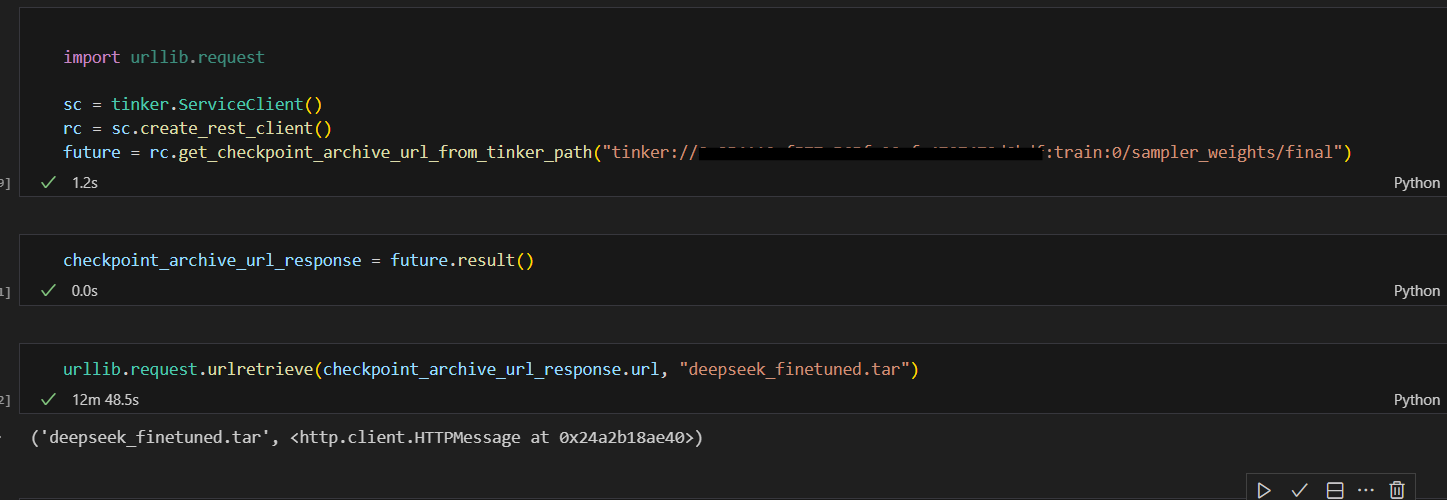
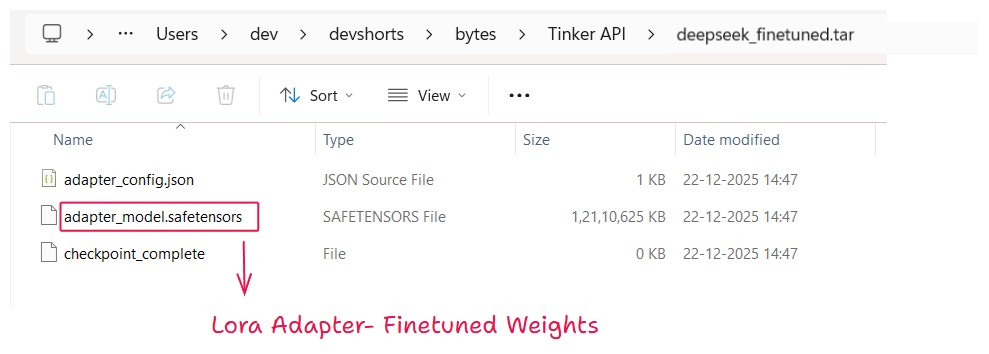
We tested the fine-tuned model using Tinker. Now let us see how to use the fine-tuned weights outside Tinker.
4. Inference and deployment options
As we can download finetuned weights - LoRA adapters, we can also use it outside the Tinker platform.
1. Load the LoRA adapter using Hugging Face PEFT
You can load the LoRA adapter on top of the base model using HuggingFace PEFT. and use for inference.
from transformers import AutoModelForCausalLM, AutoTokenizer
from peft import PeftModel

base_model = AutoModelForCausalLM.from_pretrained("deepseek-ai/DeepSeek-V3.1")
tokenizer = AutoTokenizer.from_pretrained("deepseek-ai/DeepSeek-V3.1")
model = PeftModel.from_pretrained(base_model, "./deepseek_finetuned")

prompt = "Rewrite in Dev Shorts newsletter style.\n\nOpenAI released GPT-5..."
inputs = tokenizer(prompt, return_tensors="pt").to(model.device)
outputs = model.generate(**inputs, max_new_tokens=200)
print(tokenizer.decode(outputs[0], skip_special_tokens=True))
2. Run the model with vLLM for fast inference
You can run the base model with the LoRA adapter using vLLM for fast inference.
from vllm import LLM
from vllm.lora.request import LoRARequest

llm = LLM(model="deepseek-ai/DeepSeek-V3.1", enable_lora=True)

output = llm.generate(
    "Rewrite in Dev Shorts newsletter style.\n\nOpenAI released GPT-5...",
    lora_request=LoRARequest("devshorts", 1, "./deepseek_finetuned")
)
print(output[0].outputs[0].text)
Note on hardware requirements
Running large models using Hugging Face or vLLM requires significant GPU memory. Make sure your hardware can handle the base model size.
If you do not want to manage infrastructure, you can also host the model on third party platforms that support LoRA adapters.
Conclusion
Tinker does one thing well. It lets you focus on training behavior instead of infrastructure.
If your goal is to fine tune models, Tinker is worth trying. You stay close to the training loop. You can see how the model changes at each step. And you can still take the weights and run them anywhere you want.
I hope this blog gave you a clear idea of what Tinker is and how it works.
See you in the next Bytes blog,
Until then, happy learning and happy holidays!!!