

We all know many GitHub repos now list Claude as a contributor. Even Claude's Cowork was built entirely using Claude Code. Developers have adopted Claude Code. They build custom workflows using hooks, MCP servers, and slash commands to ship faster.
Claude Skills are the newest addition to this workflow. Skills teach domain expertise.
Anthropic released Claude Skills in October 2025. They added document creation & handling capabilities to Claude using Skills. They also open-sourced the production Skills that power Claude's capabilities.
Skills unlock full potential when combined with other tools. You can combine skills with hooks and MCP Servers to automate your workflows. Since Skills launched, developers use Claude as a general-purpose agent for more than just coding.
So, I’m covering about Claude Skills and how I use them in my workflow.
What are Claude Skills
Why Claude Skills
Skills Vs MCP
Automate - Git Commit, PR workflow with Claude Skills
Automate - Invoice Generation with Claude Skills
Top Claude Code skills
1. What are Claude Skills
Skills are folders with a SKILL.md file containing instructions. The folder can also include scripts, templates, and reference docs. Each skill is self-contained in its own folder. Skills teach Claude how to complete specific tasks. They are reusable too. Claude loads the right skill when its needed.
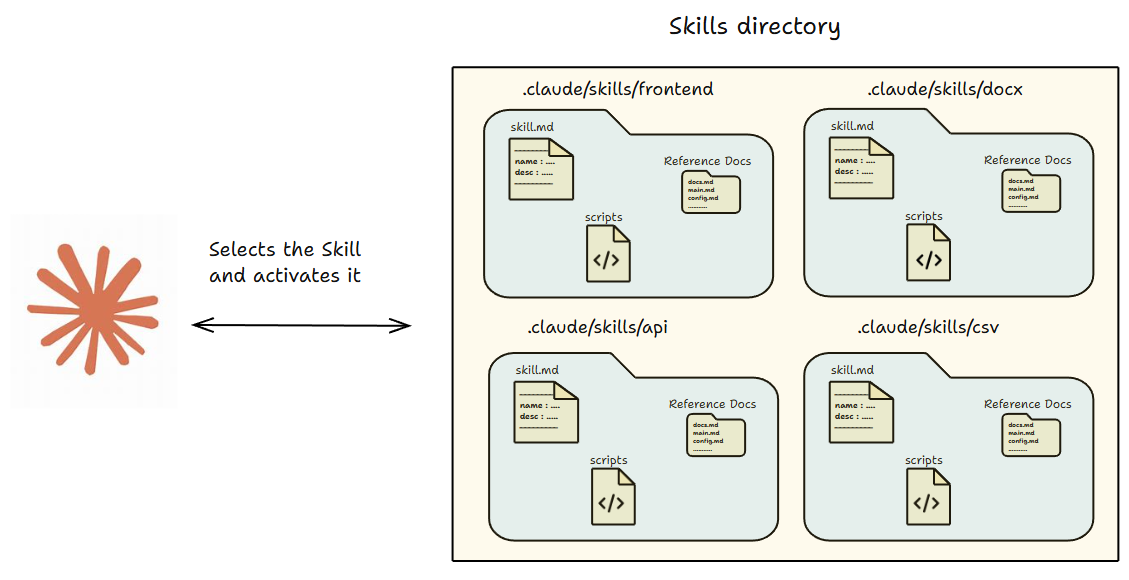
SKILL.md starts with YAML metadata and then the instructions. The metadata includes fields like name and description. Claude uses the description to decide when to apply the Skill.
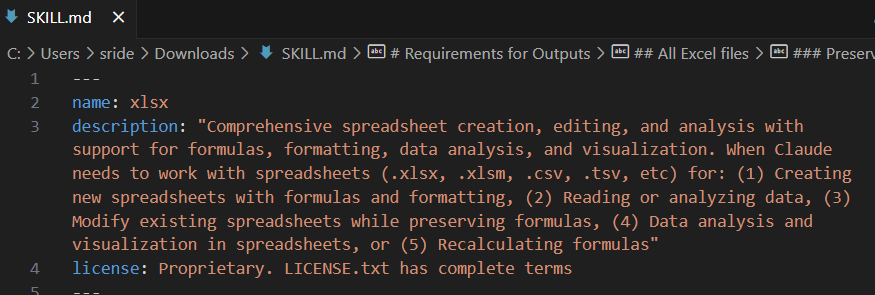
A skill is not just a markdown file. It can include code samples, reference docs, and templates in the same folder.
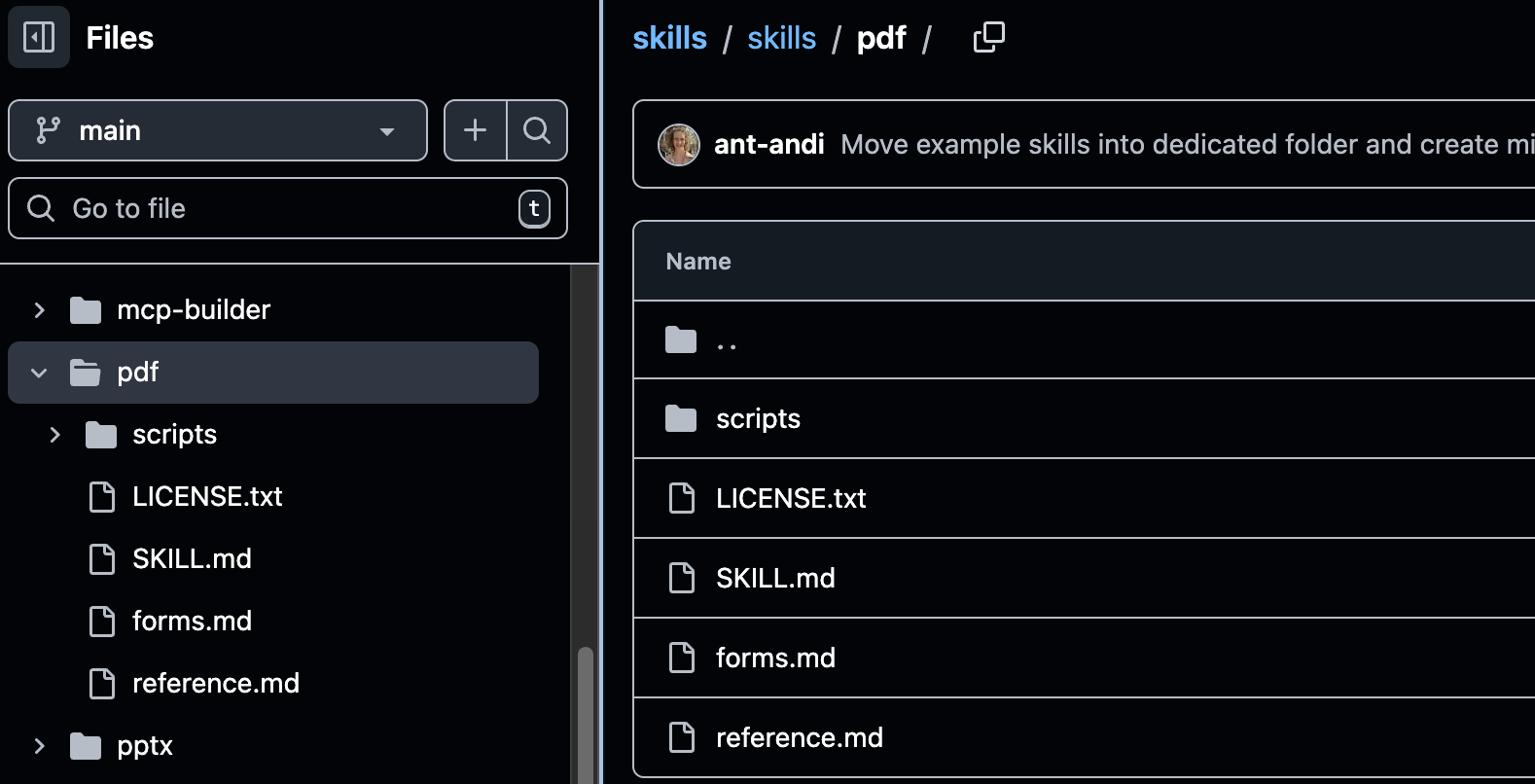
In Claude Code, you can keep Skills in two places.
Personal Skills go in
~/.claude/skills/. It can work across projects.Project Skills go in
.claude/skills/.You can commit them and share them with your team.
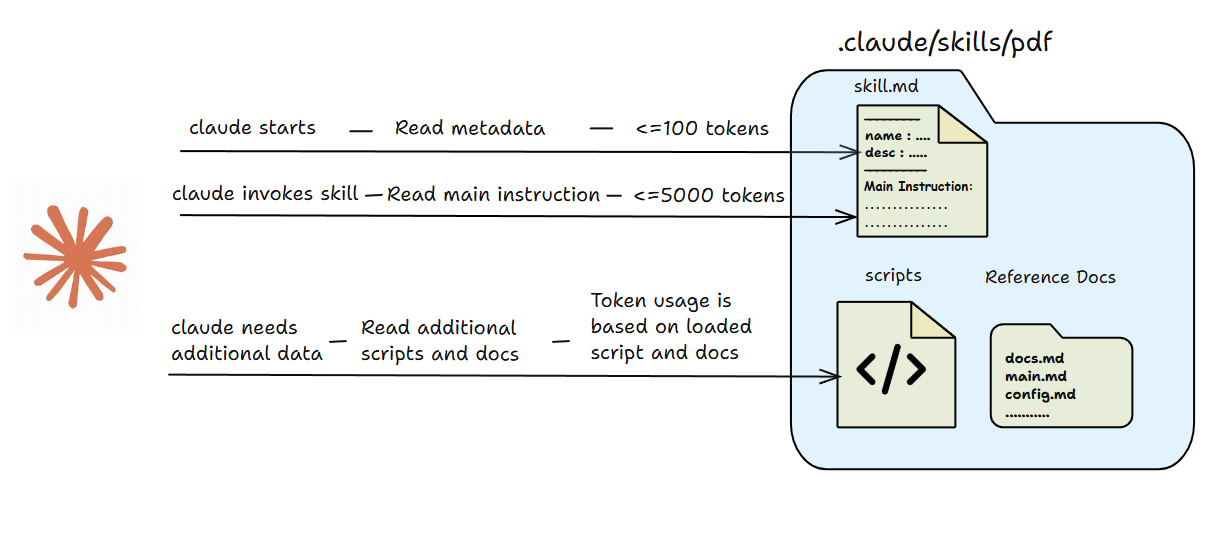
A big advantage of Skills is they are not loaded fully all the time. Claude reads small metadata first to identify the right skill. Then it loads full instructions only when needed. This keeps your context clean. You can use heavy skills with scripts and docs without bloating tokens.
Skills also work across Claude app, Claude Code. You can also integrate skills to your agent.
2. Why Claude Skills
Here is why Claude Skills are worth adding to your workflow.
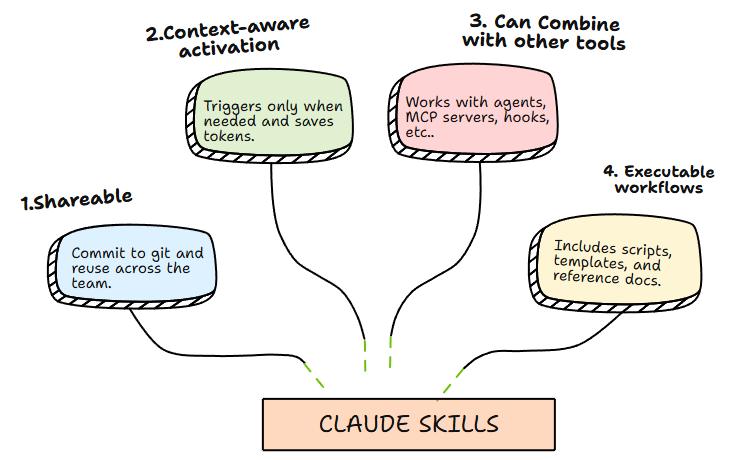
3. Skills Vs MCP
Here is a quick side by side view of how Claude Skills and MCP differ.
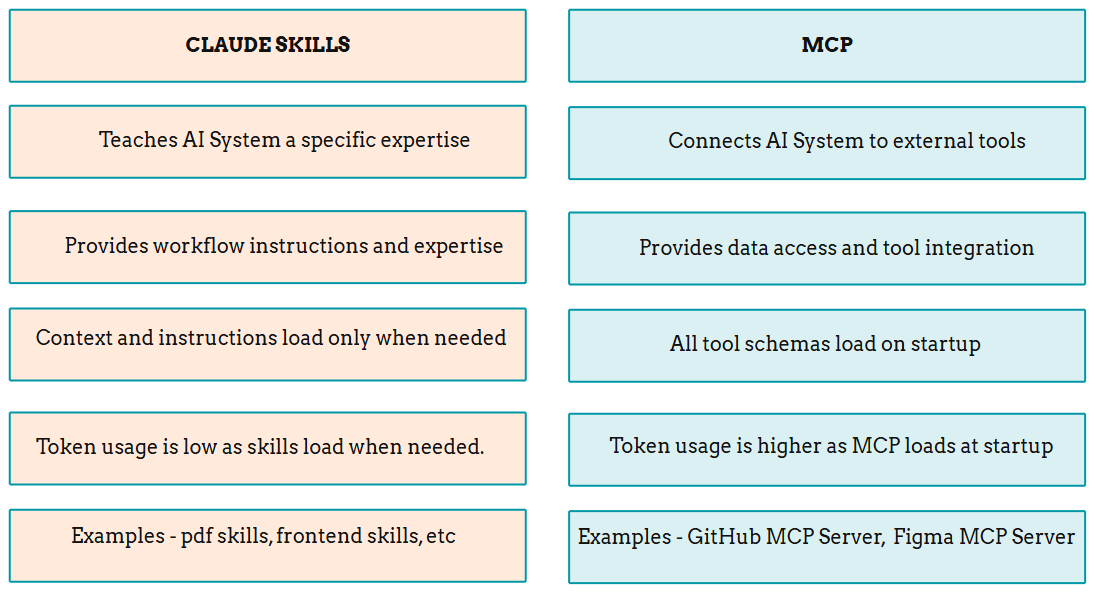
4. Automate - Git Commit, PR workflow with Claude Skills
Git commits and PR creation happen daily in my work. Running type checks, linting, writing commit messages, and filling PR descriptions add up over time.
I built a skill to automate this workflow. The skill manages everything from pre-commit checks to PR creation. It runs quality checks before every commit, commits the code with proper messages, and automatically raises pull requests with descriptions.
Claude Code handles commits and PRs natively with Git CLI. But it won't follow your exact patterns. I needed standardized commit messages, specific PR templates, and quality checks in my preferred order. So, I built a skill that enforces my workflow.
The Setup
I have three components in my workflow.
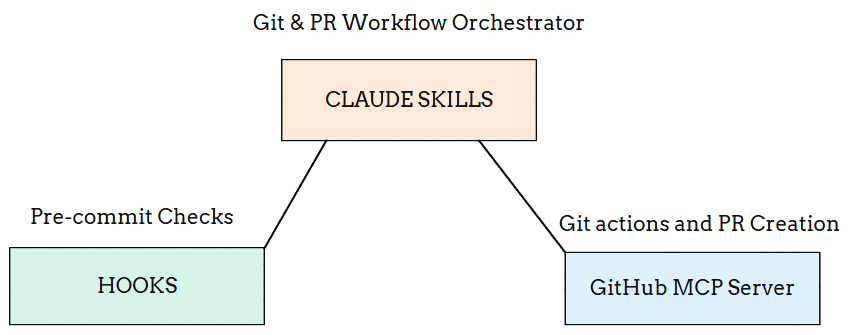
CLAUDE Skill - Workflow Orchestrator
It defines the commit-to-PR workflow. It summarizes changes, proposes commit messages, runs pre-commit checks, and orchestrates PR creation with proper descriptions.
Hook for Pre-commit Checks
It intercepts git commit commands. It runs lint, type check, and tests automatically. When checks fail, it blocks the commit and returns errors.
GitHub MCP Server - PR Automation
GitHub MCP Server handles all GitHub operations. It connects to the GitHub API and creates pull requests with descriptions, labels, and reviewers.
How It Works Together
I invoke skill- /commit-guardian
    ↓
Skill summarizes changes, proposes commit message
    ↓
Hook intercepts git commit and runs checks
    ↓
Checks fail? → Hook blocks and returns errors. Skill guides Claude to fix and retry
    ↓
Checks pass? → Commit proceeds
    ↓
Skill invokes GitHub MCP Server
    ↓
MCP creates/updates PR
    ↓
Done - PR URL returned
Setting Up the Hook
The hooks configuration lives in .claude/settings.json. You can create this using /hooks. You can also define hooks inside Claude Skill. This hook will run during Claude Skill’s lifecycle.
{
  "hooks": {
    "PreToolUse": [
      {
        "matcher": "Bash",
        "hooks": [
          {
            "type": "command",
            "command": "python .claude/hooks/commit_guard.py"
          }
        ]
      }
    ]
  }
}
Our hook executes the script - .claude/hooks/commit_guard.py. Here’s the script structure.
#.claude/hooks/commit_guard.py
# Pre-commit quality gate - runs lint, typecheck, tests

import json
import subprocess
import sys

def detect_package_manager():
    """Returns npm, yarn, or pnpm based on lock files."""
    # ...

def run_checks():
    """Runs lint, typecheck, and tests. Returns results."""
    # ...

def main():
    raw = sys.stdin.read().strip()
    data = json.loads(raw)

    # Only intercept git commit commands
    if "git commit" not in data.get("tool_input", {}).get("command", ""):
        return 0

    results = run_checks()
    failed = [r for r in results if not r[1]]

    if failed:
        sys.stderr.write("Commit blocked - checks failed\n")
        return 2  # Block commit

    return 0  # Allow commit

if __name__ == "__main__":
    raise SystemExit(main())
Creating the Skill
I created the skill based on my requirements. My commit messages follow a standard format with conventional commits using type and scope. PRs need specific templates with changes, motivation, and testing sections. The skill defines these rules. Claude follows them exactly every time.
The skill lives at .claude/skills/commit_guardian/SKILL.md.
---
name: commit_guardian
description: Manages commit workflow with quality checks and automated PR creation. Use when committing code or creating pull requests.
allowed-tools:
  - Read
  - Edit
  - Write
  - Bash
---

# Commit Guardian Workflow

## Process

1. **Pre-Commit Summary**
   - List staged files
   - Summarize changes (2-3 lines)

2. **Commit Message**
   - Format: `type(scope): description`
   - Types: feat, fix, docs, style, refactor, test, chore
   - Under 72 characters

3. **Quality Checks**
   - Hook runs: lint, typecheck, tests
   - If fail: explain, fix, rerun
   - Repeat until pass

4. **PR Creation**
   - Get branch and target
   - Use GitHub MCP to create PR
   - Add title, description, labels, reviewers

## PR Template
```
## Changes
[What changed]

## Motivation
[Why needed]

## Testing
- [ ] Tests added/updated
- [ ] Manually tested
- [ ] All checks passing
```
Setting Up GitHub MCP
Install the GitHub MCP server to Claude Code. It handles all GitHub operations.
claude mcp add-json github '{"type":"http","url":"https://api.githubcopilot.com/mcp","headers":{"Authorization":"Bearer YOUR_GITHUB_PAT"}}'Testing the workflow- Commit to PR Skill
You can manually invoke skills using their name. I invoked /commit-guardian to test the workflow. Claude can also invoke skills automatically based on context.
As this is my daily routine, I customized this flow with skills. So that it can complete the flow just like me.
Get the Code
Above mentioned skill files, scripts are available at this GitHub Repo.
5. Automate Invoice Generation with Claude Skills
I work on small projects often. I track my hours, calculate totals, and fill the invoice template. Simple work, but it adds up.
So, I automated it using Claude Skills. The goal is straightforward. Track time while I work, calculate billable hours, and generate a ready-to-send invoice PDF.
The Flow:
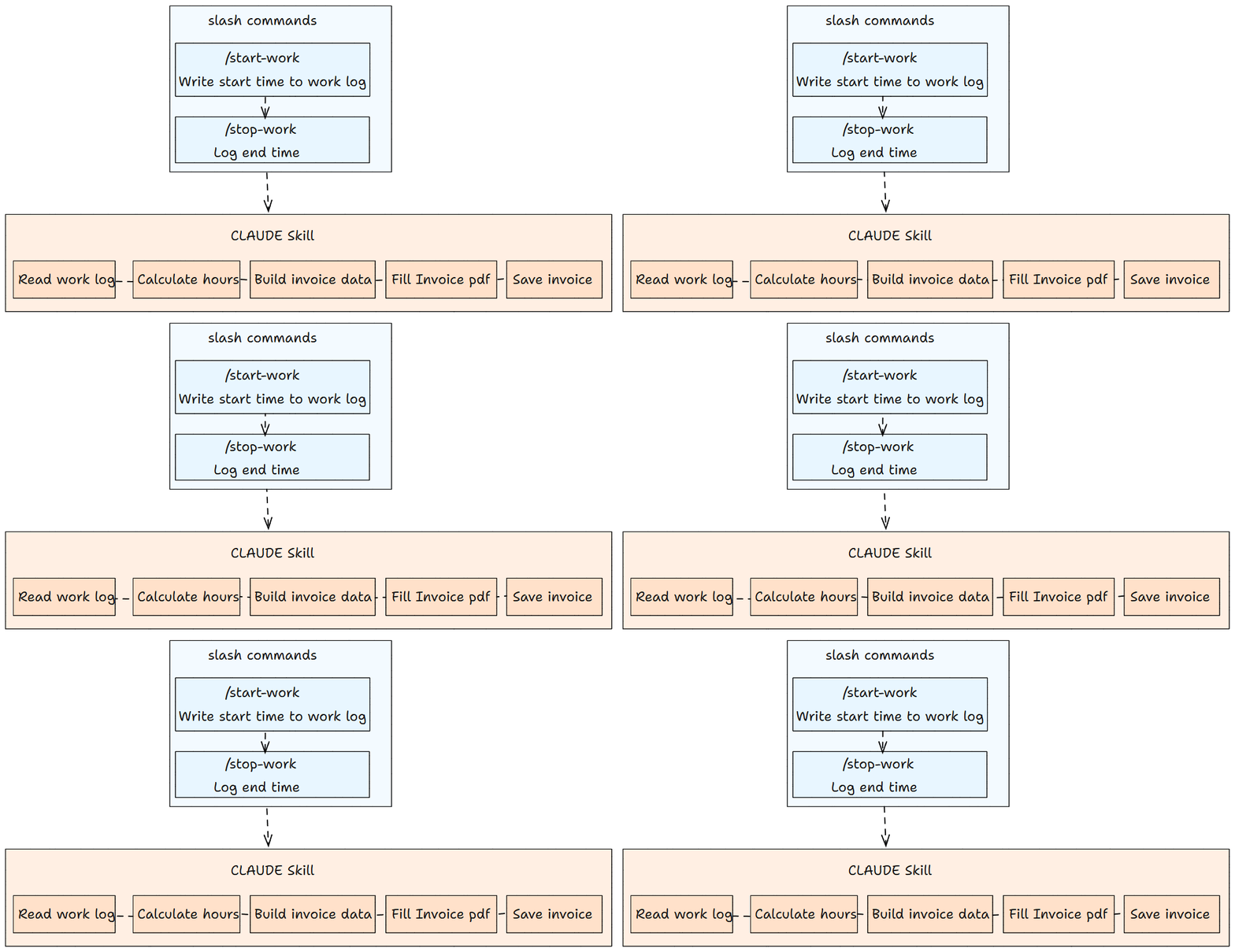
Slash commands
I created slash commands to log start and end times. The commands live in .claude/commands/.
/start-work logs the start time. /stop-work logs the end time.
If you want, you can add /pause for breaks or customize commands for your workflow.
CLAUDE Skill
The Claude skill reads .work_log.json and totals hours for the selected period. It fills the invoice PDF template using the bundled script and generates the final invoice.
How it works
Get the Code
The invoice generation skill, slash commands, and scripts are available in the GitHub repo.
6. Top Claude Code skills
Superpowers – Skills that add structured workflow commands like brainstorm and execute plan to organize development tasks.
dev-browser - Claude skills to give your agent the ability to use web browser.
mcp-builder - Skills to create MCP servers
frontend-design - Skills to create production grade frontend design.
pdf-skills - Skills to do pdf operations.
Notion Skills - Skills that teach Claude how to work in Notion.
Want to build your own skills? Check out this article on creating custom skills.
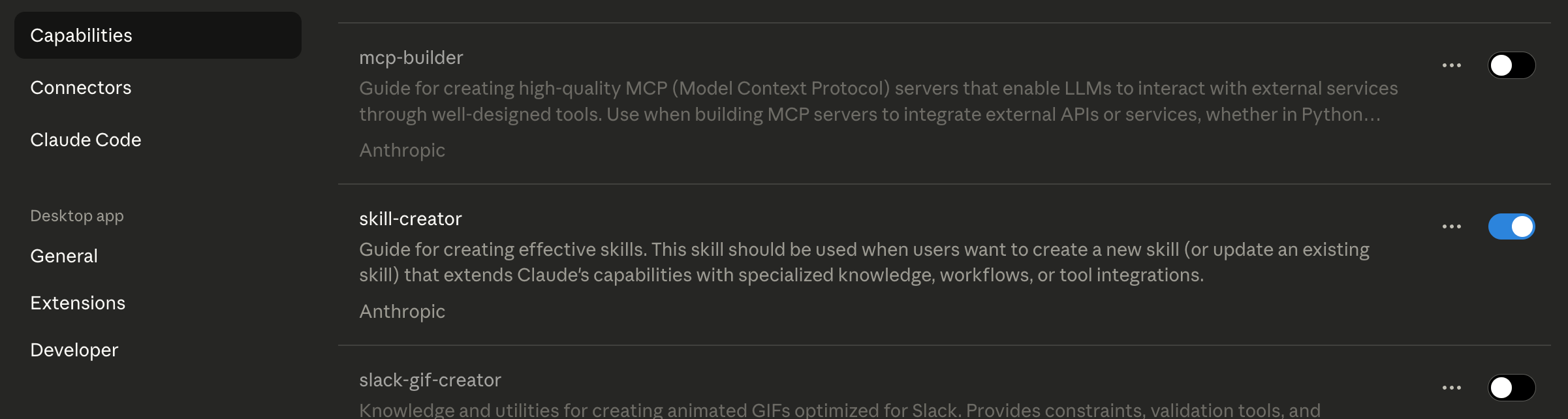
Using Skill Creator
Claude Code has a built-in skill creator. Enable it in settings and describe what you need. Claude generates the skill.md and all the files for you.
Conclusion
We covered Claude Skills and two workflows I use daily for commit automation and invoice generation.
Skills turn repetitive work into reusable instructions. Combine them with hooks and MCP to build reliable automation. See how developers use Claude Skills in production to capture ML experiment results and prevent duplicate work.
If you have repeatable routines in your day-to-day work, you can likely automate them with Skills. Build one skill for your workflow and see how much time it saves.
Happy Learning!
Wow, didn't quite grasp the full scope of Claude Skills until this piece. It makes you wonder about the long-term implications of open-sourcing these powerful production skills; what if "skill crafting" becomes a primare job for future developers, teaching AI rather than building from scratch?